google.com, pub-7005347536103574, DIRECT, f08c47fec0942fa0 Taxexcel: Income Tax
Breaking News
Loading...
Share It
Showing posts with label Income Tax. Show all posts

Tuesday, 4 August 2026


Income Tax Act 2025

 The Income-tax Act, 2025 reorganises several deduction provisions that earlier appeared under the Income-tax Act, 1961. In many cases, the 2025 law keeps the substance of the old deductions, but it shifts, renumbers, or restructures them for better legislative clarity. Therefore, taxpayers should read the new provisions carefully because some deductions remain largely unchanged, while others now rely on schedules or corresponding sections for detailed conditions.

Key deduction provisions

Old Income-tax Act, 1961

New Income-tax Act, 2025

Nature of Payment

Deduction Limit

Eligibility

Note

 80C

 123

Life insurance premium, provident fund, specified investments, deferred annuity and other eligible investments (Read Schedule XV of the Act, 2025 for more details)

Rs. 1,50,000

Individual and HUF

Only legislative restructuring. Eligible investments have been shifted to Schedule XV.

 80CCC

 123

Pension Funds

Individual

 80CCD

 124

NPS

Rs. 50,000

Individual / Employee / Employer


 80D

 126

Health Insurance Premium

Rs. 50,000 Aggregate (Health insurance up to Rs. 25,000 + Medical Expenditure up to Rs. 50,000) +

Preventive Health Check-up Rs. 5,000

Individual / HUF


 80DD

 127

Disabled Maintenance including medical treatment of a dependant with disability

Deduction

1. Disability Rs.75,000

2. Severe Disability (80% or more) Rs. 1,25,000

Resident Individual / HUF (Not eligible if dependent disabled person claimed deduction u/s 154)

No more flat deduction

 80DDB

 128

Medical treatment of diseases

Senior Citizens Rs. 1,00,000

Others Rs. 40,000

Resident Individual / HUF

Dependent definition u/s 127(9)

 80E

 129

Interest on Education Loan

Amount paid as interest

Individual


 80EE

 130

Interest on Loan for Residential House Property

Rs. 50,000

Individual


 80EEA

 131

Affordable Housing

Rs. 1,50,000

Individual


 80G

 133

Donations to specified funds and charitable institutions


All eligible assessees


 80TTA

 153

Interest on Deposits – Other than Senior Citizens

Rs. 10,000

Individual or HUF

Two earlier provisions are now brought under one statutory section with separate conditions.

 80TTB

 153

Interest on Deposits – Senior Citizens

Rs. 50,000

Senior Citizens

 80U

 154

Person with Disability

Flat Deduction –

1. Disability Rs.75,000

2. Severe Disability (80% or more) Rs. 1,25,000

Resident Individual


Friday, 10 July 2026


 Taxation often feels complex, yet with the right tools, employees can simplify the process. Therefore, the Automatic Income Tax Arrears Relief Calculator U/s 89(1) with the new Form 39 (earlier Form 10E) emerges as a powerful solution. Moreover, this calculator covers a wide span, beginning from FY 2000‑01 and extending up to FY 2026‑27, making it highly versatile. In addition, it ensures compliance with the latest rules while offering clarity for both government and non‑government employees.

Understanding Section 89(1) and Arrears Relief

First of all, Section 89(1) of the Income Tax Act provides relief when employees receive arrears or advance salary. Because arrears often push taxpayers into higher slabs, relief becomes essential. Consequently, the law allows individuals to spread the income across relevant years, thereby reducing excess tax liability. Furthermore, the new Form 39 (previously Form 10E) serves as the official format for claiming this relief. As a result, employees can confidently submit accurate details to the Income Tax Department.

Why the Automatic Calculator Matters

On the one hand, manual calculations are time‑consuming and prone to errors. On the other hand, the automatic calculator eliminates confusion. In fact, it instantly computes arrears relief, compares tax liability across years, and generates a ready‑to‑use statement. Additionally, it aligns with the latest CBDT guidelines, ensuring compliance. Thus, employees save time, avoid mistakes, and gain peace of mind.

Key Features of the Calculator

  • Wide Coverage: Since it spans FY 2000‑01 to FY 2026‑27, users can calculate relief for nearly three decades.
  • Updated Format: Because Form 10E has now been replaced by Form 39, the calculator incorporates the new structure.
  • Automatic Computation: As soon as users enter salary details, the tool computes arrears relief without manual intervention.
  • Dual Regime Comparison: Not only does it support the old regime, but it also compares with the new regime.
  • Excel‑Based Utility: Since it runs on Excel, employees can download and use it offline.
  • Error‑Free Output: Because formulas are pre‑set, the chances of miscalculation are drastically reduced.
  • Compliance Ready: As the calculator follows CBDT rules, employees can attach results directly to returns.
  • User‑Friendly Design: Even though taxation is complex, the interface remains simple and intuitive.
  • Time Saving: While manual work takes hours, the calculator delivers results within minutes.
  • Free Availability: Above all, employees can download it at no cost, making it accessible to everyone.

Benefits for Employees

To begin with, employees gain transparency in tax computation. Next, they avoid disputes with the Income Tax Department. Then, they can plan future investments more effectively. Moreover, the calculator helps them understand how arrears affect tax liability year by year. In addition, it reduces stress during filing season. Finally, it empowers individuals to comply with legal requirements without hiring expensive consultants.

Transition from Form 10E to Form 39

Earlier, employees used Form 10E to claim arrears relief. However, the CBDT introduced Form 39 as the updated version. Therefore, the calculator now integrates this new format. As a result, taxpayers can generate statements in the correct structure. Furthermore, this transition ensures smoother processing of returns. In short, the shift from Form 10E to Form 39 modernises the compliance process.

How to Use the Calculator

  1. Download the Excel File: First, employees download the free calculator.
  2. Enter Salary Details: Next, they input arrears, salary breakup, and deductions.
  3. Select Financial Years: Then, they choose the relevant years from FY 2000‑01 to FY 2026‑27.
  4. Automatic Computation Display: Immediately after entering the details, the calculator calculates and shows the relief available under Section 89(1).
  5. Generate Form 39: Finally, employees obtain a ready‑to‑submit statement for filing returns.

Because the process is straightforward, even beginners can use it without difficulty.

Why This Tool Is Essential Today

In today’s fast‑paced environment, employees often receive arrears due to pay revisions, promotions, or delayed increments. Since these arrears affect tax liability, relief under Section 89(1) becomes crucial. Therefore, the automatic calculator acts as a bridge between complex law and practical application. Moreover, it ensures that employees neither overpay nor underpay taxes. Consequently, it strengthens financial planning and compliance.

Conclusion

In conclusion, the Free Download Automatic Income Tax Arrears Relief Calculator U/s 89(1) with New Form 39 offers unmatched convenience. Because it spans FY 2000‑01 to FY 2026‑27, it remains relevant for a wide range of employees. Furthermore, it simplifies tax filing, ensures compliance, and saves valuable time. As a result, employees can focus on their careers while staying stress‑free about taxation. Ultimately, this tool transforms a complicated process into a smooth, reliable, and user‑friendly experience.

Download Automatic Income Tax Arrears Relief Calculator U/s 89(1) with New Form 39 (Previously Known as Form 10E) from FY 2000‑01 to FY 2026‑27

Free Download Automatic Income Tax Arrears Relief Calculator U/s 89(1) with New Form 39 (Previously Known as Form 10E) from FY 2000 01 to FY 2026 27

Free Download Automatic Income Tax Arrears Relief Calculator U/s 89(1) with New Form 39 (Previously Known as Form 10E) from FY 2000 01 to FY 2026 27

Wednesday, 14 May 2025


Budget 2025

Tax season is here again, and if you're a government employee in Maharashtra, you might already be feeling the pressure. Filing income tax doesn’t have to be a headache. Imagine a tool that does all the heavy lifting—like a personal assistant who understands the tax rules better than most. That’s what the Income Tax Preparation Software in Excel offers. It’s quick, reliable, and tailored for Maharashtra State employees. Let's break it down together, step by step.

Table of Contents

Sr#Headings
1What is Income Tax Preparation Software in Excel?
2Why is it Important for Maharashtra State Employees?
3Key Features of the Excel-Based Software
4What's New in the FY 2025-26 Version?
5Step-by-Step Guide to Download the Software
6How to Use the Software: A Beginner’s Guide
7Error-Free Calculations: How It Saves You Time
8Ensuring Compliance with Tax Rules and Sections
9Who Developed the Software and Is It Safe?
10Compatibility with Excel Versions
11Customizable Options for Different Employee Types
12Common Mistakes and How the Software Prevents Them
13User Reviews and Testimonials
14Troubleshooting Common Issues
15Final Thoughts and Download Link

1. What is Income Tax Preparation Software in Excel?

The Income Tax Preparation Software in Excel is a smart, spreadsheet-based tool that helps employees calculate and file their income tax accurately. Designed specifically for Indian taxpayers, especially government staff, this tool automates the entire tax computation process.

2. Why is it Important for Maharashtra State Employees?

If you work for the Maharashtra State Government, you deal with specific salary structures, allowances, and deductions. This software is built keeping those nuances in mind. It’s like having a tailor-made suit—it just fits better than a one-size-fits-all tool.

3. Key Features of the Excel-Based Software

Bold features, better benefits:

  • Auto calculation of taxable income, deductions, and rebates
  • Built-in formulas to ensure accuracy
  • Preloaded sections like 80C, 80D, HRA, LTA, etc.
  • Form 16 auto-fill based on your inputs
  • Support for Old and New Tax Regimes

4. What’s New in the FY 2025-26 Version?

Each financial year brings changes, and this tool is updated accordingly. In the 2025-26 version, you’ll find:

  • Updated tax slabs
  • Adjusted rebate limits
  • Improved UI with drop-downs and validations
  • Enhanced security macros to protect your data

5. Step-by-Step Guide to Download the Software

Downloading this software is as easy as downloading a movie or song. Follow these steps:

  1. Go to the link below to download this Excel Utility
  2. Click on the “Download Excel Tool for FY 2025-26”
  3. Save the file to your device
  4. Enable Macros when prompted in Excel
  5. You're ready to go!

Always scan the file for safety and avoid downloading from unknown sites.

6. How to Use the Software: A Beginner’s Guide

If you're new to Excel tools, don't worry. Here's how to get started:

  • Open the file in Microsoft Excel
  • Fill in your personal details (Name, PAN, DOB, etc.)
  • Enter your salary details and allowances
  • Claim deductions under various sections
  • Choose your preferred tax regime
  • Hit calculate—and voilà!

7. Error-Free Calculations: How It Saves You Time

Manual tax calculation is like solving a Rubik’s cube blindfolded—tricky and error-prone. This software handles complex calculations with built-in logic, minimising human error. It ensures correct tax liability in just minutes.

8. Ensuring Compliance with Tax Rules and Sections

The Income Tax Act has more rules than a cricket match! This software incorporates the latest changes and ensures you’re compliant with:

  • Section 80c (Investments)
  • Section 10 (Allowances)
  • Section 87a (Rebate)
  • And more…

9. Who Developed the Software, and Is It Safe?

Most versions of this tool are created by tax professionals or retired government officers. They know the system inside out. While it's usually safe, ensure you download only from trusted sources to avoid malware.

10. Compatibility with Excel Versions

Good news! The tool works on:

  • Excel 2007
  • Excel 2010
  • Excel 2013 and newer
    Just make sure Macros are enabled for full functionality.

11. Customizable Options for Different Employee Types

Whether you're a teacher, clerk, police officer, or health worker, the software offers flexible input fields. Adjustments for allowances, leave encashment, and bonus calculations are also available.

12. Common Mistakes and How the Software Prevents Them

We often miscalculate HRA, forget to claim deductions, or enter wrong PAN details. This software has built-in checks that alert you if something is off. It’s like having a smart friend watching over your shoulder.

13. User Reviews and Testimonials

Many users call it a “lifesaver during tax season.” Employees say it saves them hours of paperwork and removes confusion around the New vs Old Tax Regime choice.

14. Troubleshooting Common Issues

Facing problems? Here’s what to do:

  • Macro not working? Check your Excel settings
  • Form not opening? Make sure you're using a compatible version
  • Error in formula? Recheck the data input or download the latest file

15. Final Thoughts and Download Link

Don't wait till the last minute. Get your Income Tax Preparation Software in Excel for FY 2025-26 from the below given link now. It’s a time-saver, stress-buster, and smart way to stay compliant.

👉 Download Now from a Trusted Source

Conclusion

In today’s fast-paced world, nobody has time for complex tax forms and manual calculations. This Excel-based income tax software takes care of the grunt work so you can focus on what matters. It’s reliable, simple, and tailored for Maharashtra State Employees. If you're looking for a smoother tax filing experience in FY 2025-26, this tool is your go-to solution.

FAQs

1. Is the Excel-based income tax software free to use?
Yes, many versions are free, especially those shared by tax experts or government bodies.

2. Can I use this software if I switch to the New Tax Regime?
Absolutely! The software lets you choose between Old and New regimes easily.

3. What if I don’t know how to enable macros in Excel?
No worries! Just go to Excel options > Trust Centre> Enable Macros. A quick Google search can help, too.

4. Is this software suitable for pensioners or only working employees?
It's customizable and works for both employees and pensioners in Maharashtra.

5. How do I update the software next year?
Most creators release updates annually. Just visit the source website again for the next FY version.

Download Automatic Income Tax Preparation Software in Excel for the Maharashtra State Employees for F.Y. 2025-26

Download Automatic Income Tax Preparation Software in Excel for the Maharashtra State Employees for F.Y. 2025-26
Salary Sheet
Download Automatic Income Tax Preparation Software in Excel for the Maharashtra State Employees for F.Y. 2025-26
Form 16 Part B

Tuesday, 13 September 2022


 Income Tax Preparation Software in Excel All in One for the Non-Govt Employees for the F.Y.2022-23


Income tax tables and rates remain unchanged in the fiscal year 2022-2023. No changes to the Budget for Individual Taxpayers for 2022 have been announced. Taxpayers will be able to pay taxes under the old or new tax regime. Under the new Tax Regime, tax is levied on taxpayers at preferential rates, but significant tax deductions and exemptions are not allowed. However, income tax deductions and exemptions are available under the old tax system, but the tax rate is high. Individuals need to evaluate their tax liability under both tax systems in order to determine the ideal tax system for them. The old tax system can be beneficial for those interested in using most of the deductions and exemptions. Whereas, the new tax system could be ideal for middle-income groups with small, non-tax-oriented investments.


Budget 2022: key takeaways

The tax credit of up to Rs 12,500 under Section 87A is still available for individuals with taxable income up to Rs 5 lakh per annum. This means that individuals with an income of up to Rs 5 lacs will not incur any tax liability in the 2022-23 fiscal year and 2023-2024 valuation. A standard deduction of Rs 50,000 is also available under the old tax regime. Income tax deductions under sections 80C-80U are available under the old system for employees.


Employees can significantly reduce their tax liability by taking advantage of tax deductions under the old tax system for the fiscal year 2022-23. In fact, individuals with an income of up to Rs 13 lakh can qualify for full tax exemption by taking advantage of all eligible deductions for the 2022-23 financial year.


Income tax deduction and exemption up to Rs 1,50,000 is available for individuals under Section 80C. Section 80CCC and 80CCD (1) are included in Section 80C with an aggregate deductible ceiling of INR 1,50,000/-. Investments that qualify for deduction and exemption under Section 80C include investments in the Public Reserve Fund (PPF), the National Savings Certificate (NSC), the Equity Savings Scheme (mutual funds), Life Insurance and etc.


State Reserve Fund: One of the most popular small savings schemes among individuals. PPF offers guaranteed returns along with tax incentives. Interest is reported quarterly and interest accrues annually. Investments are provided with a fixed period of 15 years.

ELSS Funds: The equity savings scheme has the shortest lock-up period of 3 years. The investment is deductible under section 80C. Investments in mutual funds can bring higher returns than debt instruments. However, investments in the capital market are subject to volatility. Therefore, investors need to make an informed decision.


Best Equity Savings Scheme for Investment: EF 2022-23

National Savings Certificate (NSC): NSC has a 5-year blocking period. Investments are eligible for tax deductions. However, interest earned is taxable. Investment interest is announced quarterly.


Life insurance plans. Premiums paid on life insurance policies are also deductible under section 80C. The premium paid by self, spouse, dependent children and any member of an undivided Hindu family is eligible for a deduction. The post-maturity benefit is tax-free in most cases.


Senior Savings Scheme (SCSS): This scheme is designed specifically for seniors and offers the highest returns among small savings schemes. The duration of the program is 5 years with the possibility of extension up to 8 years. Under this scheme, persons over 60 years of age can make deposits.


Sukanya Samriddhi Yojana (SSY): The scheme aims at the welfare of the girl. A parent or guardian of a girl under the age of 10 is eligible to join the program. The regime applies to a maximum of 2 girls (3 in the case of twins). The maximum deduction under this scheme is Rs 1,50,000.


Income Tax Tariffs and Rates for Fiscal Year 2022-23

The mortgage principal repayment is also deductible along with the registration fee and stamp duty paid on the property. However, the allowance is capped at a maximum deduction limit of INR 150,000/-. Provided that the Individual does not transfer the property before the expiration of 5 years from the Fiscal year in which it was acquired. A registration fee and stamp duty deduction are also available for individuals who have not applied for a mortgage.


Income tax deductions U/S 80 CCD (1b)

Deposit up to Rs 50,000 - eligible for deduction under section. The deduction is greater than the available U.S. Section 80C deduction for deposits made in the National Pension Scheme (NPS) and Atal Pension Yojana (APY).

Individuals can invest in these pension schemes to qualify for tax deductions up to a maximum of Rs 50,000/-.

Download Automated Income Tax Preparation Excel-Based Software All in One for the Non-Government (Private) Employees for the Financial Year 2021-22 and Assessment Year 2022-23 U/s 115BAC


Income Tax Preparation Software in Excel

Income Tax Preparation Software in Excel

Feature of this Excel Utility:-

1) This Excel Utility Prepare Your Income Tax as per your option U/s 115BAC perfectly.


2) This Excel Utility has the all amended Income Tax Section as per Budget 2021


3) Automated Income Tax Form 12 BA


4) Automated Calculation Income Tax House Rent Exemption U/s 10(13A)


5) Individual Salary Structure as per the Non-Govt(Private) Concern’s Salary Pattern


6) Individual Salary Sheet


7) Individual Tax Computed Sheet


8) Automated Income Tax Revised Form 16 Part A&B for the F.Y.2021-22


9) Automated Income Tax Revised Form 16 Part B for the F.Y.2021-22


10) Automatic Convert the amount in to the in-words without any Excel Formula

Sunday, 9 May 2021


Look at the major changes to the income tax from April 1, 2021. With Automated Income Tax Revised 

Form 16 Part B for the F.Y.2020-21 

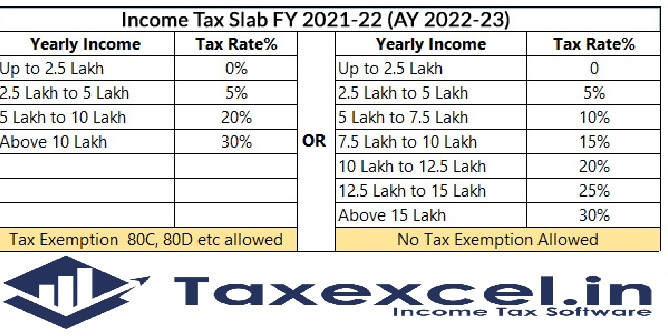
Tax Slab for the F.Y.2021-22


Significant changes in the field of income tax will take effect from 1 April 2021. The new financial year is set to begin on April 1st. Budget 2021 has some major changes for this financial year (2021). In the budget of 2021,


Finance Minister Nirmala Sitharaman did not give any exemption to the middle class and salary class in the field of income tax. However, those over the age of 75 were exempted from filing income tax returns this time.


It is decided to take action against those who do not file income tax returns. All the changes come from April 1, 2021.

Download and Prepare at a time 50 Employees Form 16 Part B for the F.Y.2020-21 with new and old tax regime U/s 115 BAC 

Form 16

If a person does not file an income tax return (ITR) from April 1, the interest rate on TDS on bank deposits will be doubled. This means that if a person does not come to the income tax outgo slab and file an ITR, the rate of TDS will be doubled.


The income tax changes come into the effect from 1 April 2021


        1. Pre-filled ITR Forms A major change to the ITR form is expected as per the 2021 budget (Pre-Filed ITR). PrefieldITR forms will contain information on securities listed, dividend income, bank/post office interest, etc. Previously filed ITR forms were available for salaried employees where income was reflected on the basis of Form 16, but now the scope is wide.


    2. Interest on PF earned from the provident fund is exempt from income tax. However, the 2021 budget proposes to provide a fund of Rs. 5 lakh taxable.


      3. Penalty for not linking Aadhaar and PAN from 1st March 2021, the date fixed for connection of Aadhaar and Income PAN. In case of non-linking, your PAN card will be valid. If failed to submit connection may result in a fine of Rs. 10,000 / -. Link PAN with 10,000 Aadhaar as per Section 272 B of the Income Tax Act


                4. Higher TDS / TCS rates for non-filers of income tax returns (ITR) A new section 206 AB (ITR) has been inserted in the Income Tax Act as a special provision for higher rates for TDS for non-filers of income tax returns.

Download and Prepare at a time 100 Employees Form 16 Part B for the F.Y.2020-21 with new and old tax regime U/s 115 BAC


Income Tax

The proposed rate on non-filers is higher than below: twice the rate or 5% more than double the rate prescribed in the relevant provisions of the law, similarly, a new section 206 CCA has been inserted in the Income Tax Act as a special provision for non-filing of income tax returns (ITR). Providing higher rates for TDS for filers The proposed rate for non-filers is higher than the following: 2% to 5% of the rate specified in the relevant provisions of the Act


  5. Provide the bills under the LTC cash voucher scheme


To avail tax benefits under the LTC Cash Voucher Scheme, ensure that the required bills in the correct format containing the GST amount and the seller's GST number have been submitted to your employer (if the employer is proposing this scheme) on or before March 31, 2021. Employees will have to spend three times the amount considered as LTA rent on goods and services that attract 12% or more GST.

Download and Prepare One by One Form 16 Part B for the F.Y.2020-21 with new and old tax regime U/s 115 BAC


Income Tax Form 16

No tax filing for senior citizens above 5 years of age, those over 75 years of age and those whose pension income and interest on fixed deposits come to the same bank and who have only interest income, are not required to file an income tax return.


The bank will deduct the income tax that he has to pay and the money that he has to pay to the government. The condition is that only the pension income of the person and the interest on the fixed deposit should be deposited in the same bank.


Relief of Super Senior Citizens


Senior Citizen

Does the TDS rule apply to senior citizens? From April 1, 2021, senior citizens over the age of 75 will not have to do ITR. This exemption has been granted to senior citizens who are dependent on pension or fixed deposit interest.

google.com, pub-7005347536103574, DIRECT, f08c47fec0942fa0