Breaking News
Loading...
Share It
Showing posts with label Arrears Relief Calculator U/s 89(1) with Form 10E. Show all posts

Friday, 13 February 2026


First of all, filing income tax no longer needs to feel confusing or stressful. In fact, with the Tax Preparation Excel-based Software All-in-One, you can calculate, plan, and prepare your income tax for FY 2025-26 smoothly and confidently. Whether you work in a government office or a private company, this Excel-based solution helps you stay compliant without relying on expensive software or professional help. Moreover, it works like a digital calculator with a brain, doing the hard work while you stay in control.

Table of Contents

Sr#Headings
1Overview of Excel-Based Tax Software
2Why Choose Excel for Tax Preparation
3Who Can Use This Software
4Key Features of All-in-One Tax Tool
5Automatic Income & Tax Calculation
6Support for Old and New Tax Regime
7Deductions, Exemptions & Rebates
8Form 16, Form 10E & Other Reports
9Ease of Use for Non-Technical Users
10Accuracy, Compliance & Updates
11Time Saving & Cost-Effective Solution
12Data Security & Customisation
13Benefits for Govt Employees
14Benefits for Non-Govt Employees
15Why This Software Is Future-Ready

1. Overview of Excel-Based Tax Software

To begin with, this Tax Preparation Excel-based Software All-in-One simplifies income tax preparation for salaried individuals in a practical and user-friendly way. First of all, it brings all tax-related calculations into one structured Excel file. Instead of switching between multiple websites, tools, and calculators, you can complete everything in a single place. Moreover, it automatically calculates income, deductions, tax slabs, and final tax payable. Consequently, users save time, avoid confusion, and gain complete control over their tax data. As a result, tax preparation becomes faster, smoother, and more reliable.

2. Why Choose Excel for Tax Preparation

Notably, Excel remains one of the most familiar tools for working professionals. Therefore, users do not need special training or technical knowledge. Additionally, Excel offers flexibility, transparency, and full visibility of calculations. In other words, users can track every formula and figure step by step. Furthermore, Excel works like a clear glass window, allowing you to see how each value affects your final tax. As a consequence, confidence increases, errors reduce, and decision-making improves significantly.

3. Who Can Use This Software

Importantly, both Government and Non-Government employees can use this Excel-based tax software effectively. Whether you work as a teacher, clerk, officer, IT professional, accountant, or private employee, this tool adapts easily to your salary structure. Moreover, it suits beginners as well as experienced users. Hence, it serves a wide audience. Ultimately, it fulfils the needs of the general public without limitations.

4. Key Features of the All-in-One Tax Tool

Above all, this software combines income details, deductions, tax calculations, and reports in one integrated system. Furthermore, it removes the need for repetitive manual entries. Consequently, users experience fewer mistakes and faster processing. Additionally, built-in automation improves accuracy and consistency. As a result, tax filing becomes smooth, dependable, and stress-free.

5. Automatic Income & Tax Calculation

Once users enter salary details, the software instantly calculates gross income, taxable income, and final tax payable. Thus, it eliminates long hours of manual work. Meanwhile, smart formulas handle complex calculations in the background. Therefore, accuracy remains consistent every time. Eventually, users gain quick and reliable tax results without effort.

6. Support for Old and New Tax Regime

Equally important, this Excel tool supports both the old and new tax regimes for FY 2025-26. Therefore, users can compare tax liability under both options side by side. Additionally, it helps identify the most beneficial regime. Consequently, decision-making becomes simple, logical, and transparent. As a result, users avoid confusion and choose wisely.

7. Deductions, Exemptions & Rebates

In addition, the software automatically considers deductions under Section 80C, 80D, 80CCD, and other applicable sections. Similarly, it calculates exemptions such as HRA and standard deduction accurately. Moreover, it applies rebates wherever eligible. Consequently, users never miss legitimate tax benefits. Ultimately, this leads to optimised tax savings.

8. Form 16, Form 10E & Other Reports

Another major advantage is the automatic generation of Form 16 and Form 10E. As a result, arrears relief calculations become simple and error-free. Furthermore, the software creates printable and filing-ready reports. Therefore, documentation stays organised. In turn, filing income tax returns becomes effortless.

9. Ease of Use for Non-Technical Users

Surprisingly, even users with minimal Excel knowledge can operate this software comfortably. Because it uses simple input fields, drop-down options, and clear instructions, anyone can use it confidently. Hence, no technical background is required. Consequently, beginners feel empowered instead of confused.

10. Accuracy, Compliance & Regular Updates

Most importantly, the software follows the latest income tax rules applicable for FY 2025-26. Therefore, calculations remain compliant with current laws. Additionally, logical formulas significantly reduce human errors. As a result, users gain peace of mind knowing their tax data is accurate and lawful.

11. Time-Saving & Cost-Effective Solution

Compared to hiring tax consultants or purchasing expensive software, this Excel tool saves money. Likewise, it saves time by delivering instant results. Moreover, users avoid recurring professional fees. In short, it delivers maximum value with minimum investment.

12. Data Security & Customisation

Unlike online tax tools, this Excel-based software keeps all data on your personal computer. Consequently, privacy stays fully protected. Moreover, users can customise sheets according to their personal or organisational needs. As a result, flexibility and security go hand in hand.

13. Benefits for Government Employees

For government employees, the software aligns perfectly with salary structures, allowances, and arrears systems. Therefore, it ensures precise tax computation. Additionally, it simplifies departmental reporting. Ultimately, government staff manage taxes independently and confidently.

14. Benefits for Non-Government Employees

Similarly, private sector employees benefit from flexible income inputs and deduction options. Thus, the software adapts to both fixed and variable salary patterns. Moreover, it handles incentives, bonuses, and allowances smoothly. Consequently, it suits private employees perfectly.

15. Why This Software Is Future-Ready

Finally, as income tax rules continue to evolve, Excel-based solutions remain adaptable. In essence, this software works like a Swiss Army knife for tax planning. Therefore, it stays relevant for future financial years. Ultimately, users remain prepared for upcoming changes.

In Conclusion

In conclusion, the Tax Preparation Excel-based Software All-in-One for FY 2025-26 delivers simplicity, accuracy, and complete control. Whether you are a government or non-government employee, this Excel utility makes tax preparation easier, faster, and stress-free. Ultimately, it empowers users to manage taxes confidently without unnecessary complexity.

Frequently Asked Questions (FAQs)

Is this Excel-based tax software suitable for beginners?
Yes, it uses simple inputs and clear instructions, making it beginner-friendly.

Does the software support both old and new tax regimes?
Absolutely, it allows easy comparison between both regimes for FY 2025-26.

Can government employees use this software effectively?
Yes, it is fully suitable for government salary structures and allowances.

Is my personal tax data safe in this Excel tool?
Yes, all data remains offline on your computer, ensuring complete privacy.

Does this software help in preparing Form 16 and Form 10E?
Yes, it provides automatic calculation and preparation support for both forms.

Download Automatic Income Tax Preparation Software in Excel All-in-One (FY 2025-26)

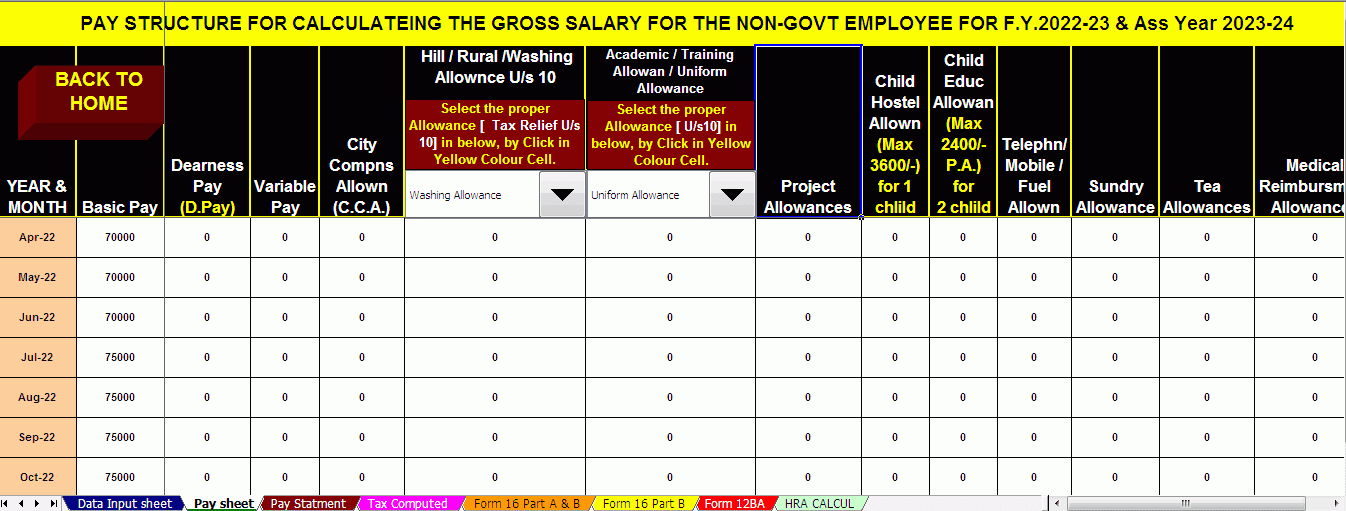
[caption id="attachment_7255" align="aligncenter" width="1351"]Download Automatic Income Tax Preparation Software in Excel All-in-One for Govt and Non-Govt Employees (FY 2025-26) Salary Structure[/caption]

Download Automatic Income Tax Preparation Software in Excel All-in-One for Govt and Non-Govt Employees (FY 2025-26) Form 16 Part A&B

Main Features of this Excel Utility are:-

  1. First of all, this automatic tax calculator in Excel delivers the most accurate results and stays fully updated for the FY 2025-26 tax year.
  2. Secondly, it automatically computes salary income, taxable income, and final tax liability without manual calculations.
  3. Moreover, the tool calculates all eligible deductions, exemptions, and rebates precisely as per current income tax rules.
  4. In addition, it efficiently computes arrears relief and generates Form 10E automatically, saving valuable time.
  5. Meanwhile, the software prepares Form 16 instantly with correct figures and proper formatting.
  6. Furthermore, it accurately calculates HRA exemption, ensuring you claim the maximum permissible benefit.
  7. Likewise, the Excel utility allows a clear comparison between the old and new tax regimes, helping you choose the most beneficial option.
  8. As a result, both Government and Non-Government salaried employees can manage tax preparation confidently and independently.
  9. Consequently, users reduce errors, avoid last-minute stress, and ensure full compliance with tax laws.
  10. Finally, this all-in-one Excel tax calculator simplifies the entire tax process while improving accuracy, speed, and reliability.

Sunday, 8 February 2026


Form 16

First of all, filing income tax no longer needs to feel confusing or stressful. In fact, with the Tax Preparation Excel-based Software All-in-One, you can calculate, plan, and prepare your income tax for FY 2025-26 smoothly and confidently. Whether you work in a government office or a private company, this Excel-based solution helps you stay compliant without relying on expensive software or professional help. Moreover, it works like a digital calculator with a brain, doing the hard work while you stay in control.

Table of Contents

Sr#Headings
1Overview of Excel-Based Tax Software
2Why Choose Excel for Tax Preparation
3Who Can Use This Software
4Key Features of All-in-One Tax Tool
5Automatic Income & Tax Calculation
6Support for Old and New Tax Regime
7Deductions, Exemptions & Rebates
8Form 16, Form 10E & Other Reports
9Ease of Use for Non-Technical Users
10Accuracy, Compliance & Updates
11Time Saving & Cost-Effective Solution
12Data Security & Customisation
13Benefits for Govt Employees
14Benefits for Non-Govt Employees
15Why This Software Is Future-Ready

1. Overview of Excel-Based Tax Software

To begin with, this Tax Preparation Excel-based Software All-in-One simplifies income tax preparation for salaried individuals in a practical and user-friendly way. First of all, it brings all tax-related calculations into one structured Excel file. Instead of switching between multiple websites, tools, and calculators, you can complete everything in a single place. Moreover, it automatically calculates income, deductions, tax slabs, and final tax payable. Consequently, users save time, avoid confusion, and gain complete control over their tax data. As a result, tax preparation becomes faster, smoother, and more reliable.

2. Why Choose Excel for Tax Preparation

Notably, Excel remains one of the most familiar tools for working professionals. Therefore, users do not need special training or technical knowledge. Additionally, Excel offers flexibility, transparency, and full visibility of calculations. In other words, users can track every formula and figure step by step. Furthermore, Excel works like a clear glass window, allowing you to see how each value affects your final tax. As a consequence, confidence increases, errors reduce, and decision-making improves significantly.

3. Who Can Use This Software

Importantly, both Government and Non-Government employees can use this Excel-based tax software effectively. Whether you work as a teacher, clerk, officer, IT professional, accountant, or private employee, this tool adapts easily to your salary structure. Moreover, it suits beginners as well as experienced users. Hence, it serves a wide audience. Ultimately, it fulfils the needs of the general public without limitations.

4. Key Features of the All-in-One Tax Tool

Above all, this software combines income details, deductions, tax calculations, and reports in one integrated system. Furthermore, it removes the need for repetitive manual entries. Consequently, users experience fewer mistakes and faster processing. Additionally, built-in automation improves accuracy and consistency. As a result, tax filing becomes smooth, dependable, and stress-free.

5. Automatic Income & Tax Calculation

Once users enter salary details, the software instantly calculates gross income, taxable income, and final tax payable. Thus, it eliminates long hours of manual work. Meanwhile, smart formulas handle complex calculations in the background. Therefore, accuracy remains consistent every time. Eventually, users gain quick and reliable tax results without effort.

6. Support for Old and New Tax Regime

Equally important, this Excel tool supports both the old and new tax regimes for FY 2025-26. Therefore, users can compare tax liability under both options side by side. Additionally, it helps identify the most beneficial regime. Consequently, decision-making becomes simple, logical, and transparent. As a result, users avoid confusion and choose wisely.

7. Deductions, Exemptions & Rebates

In addition, the software automatically considers deductions under Section 80C, 80D, 80CCD, and other applicable sections. Similarly, it calculates exemptions such as HRA and standard deduction accurately. Moreover, it applies rebates wherever eligible. Consequently, users never miss legitimate tax benefits. Ultimately, this leads to optimised tax savings.

8. Form 16, Form 10E & Other Reports

Another major advantage is the automatic generation of Form 16 and Form 10E. As a result, arrears relief calculations become simple and error-free. Furthermore, the software creates printable and filing-ready reports. Therefore, documentation stays organised. In turn, filing income tax returns becomes effortless.

9. Ease of Use for Non-Technical Users

Surprisingly, even users with minimal Excel knowledge can operate this software comfortably. Because it uses simple input fields, drop-down options, and clear instructions, anyone can use it confidently. Hence, no technical background is required. Consequently, beginners feel empowered instead of confused.

10. Accuracy, Compliance & Regular Updates

Most importantly, the software follows the latest income tax rules applicable for FY 2025-26. Therefore, calculations remain compliant with current laws. Additionally, logical formulas significantly reduce human errors. As a result, users gain peace of mind knowing their tax data is accurate and lawful.

11. Time-Saving & Cost-Effective Solution

Compared to hiring tax consultants or purchasing expensive software, this Excel tool saves money. Likewise, it saves time by delivering instant results. Moreover, users avoid recurring professional fees. In short, it delivers maximum value with minimum investment.

12. Data Security & Customisation

Unlike online tax tools, this Excel-based software keeps all data on your personal computer. Consequently, privacy stays fully protected. Moreover, users can customise sheets according to their personal or organisational needs. As a result, flexibility and security go hand in hand.

13. Benefits for Government Employees

For government employees, the software aligns perfectly with salary structures, allowances, and arrears systems. Therefore, it ensures precise tax computation. Additionally, it simplifies departmental reporting. Ultimately, government staff manage taxes independently and confidently.

14. Benefits for Non-Government Employees

Similarly, private sector employees benefit from flexible income inputs and deduction options. Thus, the software adapts to both fixed and variable salary patterns. Moreover, it handles incentives, bonuses, and allowances smoothly. Consequently, it suits private employees perfectly.

15. Why This Software Is Future-Ready

Finally, as income tax rules continue to evolve, Excel-based solutions remain adaptable. In essence, this software works like a Swiss Army knife for tax planning. Therefore, it stays relevant for future financial years. Ultimately, users remain prepared for upcoming changes.

In Conclusion

In conclusion, the Tax Preparation Excel-based Software All-in-One for FY 2025-26 delivers simplicity, accuracy, and complete control. Whether you are a government or non-government employee, this Excel utility makes tax preparation easier, faster, and stress-free. Ultimately, it empowers users to manage taxes confidently without unnecessary complexity.

Frequently Asked Questions (FAQs)

Is this Excel-based tax software suitable for beginners?
Yes, it uses simple inputs and clear instructions, making it beginner-friendly.

Does the software support both old and new tax regimes?
Absolutely, it allows easy comparison between both regimes for FY 2025-26.

Can government employees use this software effectively?
Yes, it is fully suitable for government salary structures and allowances.

Is my personal tax data safe in this Excel tool?
Yes, all data remains offline on your computer, ensuring complete privacy.

Does this software help in preparing Form 16 and Form 10E?
Yes, it provides automatic calculation and preparation support for both forms.

Download Automatic Income Tax Preparation Software in Excel All-in-One (FY 2025-26)

[caption id="attachment_7255" align="aligncenter" width="1351"]Download Automatic Income Tax Preparation Software in Excel All-in-One for Govt and Non-Govt Employees (FY 2025-26) Salary Structure[/caption]

Download Automatic Income Tax Preparation Software in Excel All-in-One for Govt and Non-Govt Employees (FY 2025-26) Form 16 Part A&B

Main Features of this Excel Utility are:-

  1. First of all, this automatic tax calculator in Excel delivers the most accurate results and stays fully updated for the FY 2025-26 tax year.
  2. Secondly, it automatically computes salary income, taxable income, and final tax liability without manual calculations.
  3. Moreover, the tool calculates all eligible deductions, exemptions, and rebates precisely as per current income tax rules.
  4. In addition, it efficiently computes arrears relief and generates Form 10E automatically, saving valuable time.
  5. Meanwhile, the software prepares Form 16 instantly with correct figures and proper formatting.
  6. Furthermore, it accurately calculates HRA exemption, ensuring you claim the maximum permissible benefit.
  7. Likewise, the Excel utility allows a clear comparison between the old and new tax regimes, helping you choose the most beneficial option.
  8. As a result, both Government and Non-Government salaried employees can manage tax preparation confidently and independently.
  9. Consequently, users reduce errors, avoid last-minute stress, and ensure full compliance with tax laws.
  10. Finally, this all-in-one Excel tax calculator simplifies the entire tax process while improving accuracy, speed, and reliability.

Wednesday, 13 August 2025


Budget 2025

Introduction

The New Tax Regime for the Financial Year 2025-26 (Assessment Year 2026-27) has caught the attention of both Government and Non-Government employeesIn other words, with reduced tax rates and simplified slabs, it promises more take-home income and less calculation stress. But here’s the catch—understanding these benefits can still feel like reading a complex puzzle.  However, that’s where Automatic Income Tax Preparation Software in Excel with Form 10E comes in, making your tax journey as smooth as a freshly paved road.

Table of Contents

Sr#Headings
1Understanding the New Tax Regime for FY 2025-26
2Key Differences Between Old and New Tax Regime
3Who Can Benefit from the New Tax Regime?
4Tax Slabs and Rates Under the New Regime
5Standard Deduction in the New Tax Regime
6Common Deductions Not Available in the New Regime
7Why Form 10E Matters for Arrears Relief
8How Automatic Income Tax Preparation Software Helps
9Features of Income Tax Calculator All in One with Form 10e
10Step-by-Step Process of Using the Excel Tool
11Benefits for Government Employees
12Benefits for Non-Government Employees
13Accuracy and Time-Saving Advantages
14Budget 2025 Highlights Affecting the New Regime
15Final Thoughts on Choosing the Right Regime

1. Understanding the New Tax Regime for FY 2025-26

The New Tax Regime offers reduced tax rates and simplified structures, aiming to benefit salaried individuals. Therefore, it is optional, meaning you can choose it if it suits your financial situation.

2. Key Differences Between Old and New Tax Regime

The old regime allows numerous deductions and exemptions, while the new regime focuses on lower rates with minimal deductions. It’s like choosing between a buffet with many small dishes or a set menu with fewer but larger servings.

3. Who Can Benefit from the New Tax Regime?

This regime is particularly useful for taxpayers who do not claim multiple deductions, such as those without housing loan interest, large insurance premiums, or significant investments in tax-saving instruments.

4. Tax Slabs and Rates Under the New Regime

For FY 2025-26, the slabs under the new regime are structured to reduce tax burdens for most middle-income earners. Lower rates apply to each slab, making it attractive for those with straightforward salary structures.

5. Standard Deduction in the New Tax Regime

standard deduction of ₹75,000 is now available under the new regime, as announced in Budget 2025. This helps increase your taxable income relief without needing additional paperwork.

6. Common Deductions Not Available in the New Regime

You will miss out on deductions like 80C80D, and HRA exemption. This is a trade-off—lower tax rates in exchange for fewer claims.

7. Why Form 10E Matters for Arrears Relief

If you receive salary arrears, you must submit Form 10E to claim relief under Section 89(1). Without it, your tax filing could face complications and possible notices from the Income Tax Department.

8. How Automatic Income Tax Preparation Software Helps

The Excel-based Automatic Income Tax Preparation Software simplifies everything—tax calculations, arrears relief computation, and salary sheet generation—without needing advanced tax knowledge.

9. Features of Income Tax Calculator All in One with Form 10e

  • Pre-built formulas for tax computation
  • HRA exemption calculation
  • Arrears relief calculation with Form 10E
  • Salary sheet generation for both Govt and Non-Govt employees
  • Instant tax liability display

10. Step-by-Step Process of Using the Excel Tool

  1. Enter your personal and salary details
  2. Select the financial year and regime option
  3. Input arrears details (if any) for Form 10E
  4. Review the automatically generated computation sheet
  5. Save and use the report for filing returns

11. Benefits for Government Employees

Government employees can save significant time with inbuilt salary structures specific to government pay scales, making calculations accurate and compliant.

12. Benefits for Non-Government Employees

Private sector employees benefit from customisation options for variable salary components like bonuses, allowances, and performance incentives.

13. Accuracy and Time-Saving Advantages

Manual tax calculation is like solving a 500-piece jigsaw puzzle in the dark. The Excel tool lights up the room, helping you finish in minutes without mistakes.

14. Budget 2025 Highlights Affecting the New Regime

The Budget 2025 increased the standard deduction, adjusted slabs for inflation, and confirmed that the new regime remains the default tax option unless opted out.

15. Final Thoughts on Choosing the Right Regime

Choosing between old and new regimes depends on your deduction claims and financial goals. The Excel tool with Form 10E ensures that whichever you choose, your filing is seamless.

Understanding the New Tax Regime for FY 2025-26

The New Tax Regime introduced for the Financial Year 2025-26 (Assessment Year 2026-27) is designed to make taxation simpler and fairer for individuals. It follows the philosophy that a straightforward system is easier for both the taxpayer and the Income Tax Department to manage. The Government has tried to reduce the dependency on multiple deductions and exemptions, and instead, it focuses on lower tax rates for everyone.

In practical terms, this means fewer complicated calculations, fewer forms to fill out, and faster processing when you file your tax return. It also reduces the chances of disputes or reassessments because there are fewer points where mistakes can happen.

The New Tax Regime is now the default tax system for salaried individuals unless they specifically opt for the old regime. So if you don’t make a choice, you’ll be automatically taxed under the new regime.

Key Differences Between Old and New Tax Regime

Think of the old regime as a detailed shopping bill with dozens of small discounts here and there, and the new regime as a flat 20% sale on the entire bill. In the old regime, you could reduce your taxable income through many exemptions like HRA, LTA, and deductions under various sections such as 80C, 80D, and 80E.

In the new regime, you don’t get these deductions, but the income tax slabs are much lower. This is why it’s important to calculate and compare both regimes before deciding which one saves you more money.

For many taxpayers who do not have large housing loans or significant investments in tax-saving instruments, the new regime often results in a lower tax outgo.

Who Can Benefit from the New Tax Regime?

You might benefit from the new tax regime if:

  • You don’t have a home loan or you’ve already repaid it.
  • You don’t invest heavily in 80C instruments like PPF, NSC, or ELSS.
  • Your employer does not give you substantial allowances that are tax-exempt under the old regime.
  • You prefer a no-hassle approach to tax filing without tracking multiple receipts and proofs.

For Government employees, the new regime can be attractive if their salary structure is straightforward without many special allowances. For Non-Government employees, especially in the private sector with variable pay, the reduced rates can significantly increase monthly take-home salary.

Tax Slabs and Rates Under the New Regime

For FY 2025-26, the Income Tax slabs under the new regime are as follows:

  • Income up to ₹3 lakh: No tax
  • ₹3 lakh to ₹7 lakh: 5%
  • ₹7 lakh to ₹10 lakh: 10%
  • ₹10 lakh to ₹12 lakh: 15%
  • ₹12 lakh to ₹15 lakh: 20%
  • Above ₹15 lakh: 30%

If your income is up to ₹7 lakh, you are eligible for a rebate under Section 87A, which means you pay zero tax.

Standard Deduction in the New Tax Regime

One of the big improvements in Budget 2025 is the increased standard deduction of ₹75,000 under the new regime. This directly reduces your taxable salary without needing you to provide any proof or documentation.

For example, if your salary is ₹10,00,000, the taxable amount will be ₹9,25,000 after applying the standard deduction. This is a direct saving without paperwork.

Common Deductions Not Available in the New Regime

While the new regime offers lower tax rates, you lose access to certain deductions, such as:

  • Section 80C (Investments like PPF, NSC, ELSS, Life Insurance)
  • Section 80D (Medical insurance premium)
  • HRA exemption under Section 10(13A)
  • LTA exemption for travel expenses
  • Home loan interest deduction under Section 24(b)

This is why it’s important to compare the old vs the new regime before finalising.

Why Form 10E Matters for Arrears Relief

If you received salary arrears, they can increase your taxable income in the current year, possibly pushing you into a higher tax slab. Form 10E helps you spread this income over the years it actually belongs to, reducing your tax burden.

Without Form 10E, your claim for arrears relief under Section 89(1) can be denied by the Income Tax Department.

How Automatic Income Tax Preparation Software Helps

Manually calculating taxes, especially when arrears are involved, is like trying to solve a Rubik’s cube blindfolded—it’s possible, but not fun. The Automatic Income Tax Preparation Software in Excel takes away the stress by automatically:

  • Applying the correct tax slabs for the selected regime
  • Calculating standard deductions
  • Generating Form 10E for arrears relief
  • Creating salary sheets in seconds

Features of Income Tax Calculator All in One with Form 10e

This Excel-based tool is designed for both Government and Non-Government employees and includes:

  • Automatic tax computation based on your inputs
  • Built-in salary structures for quick entry
  • HRA calculation under Section 10(13A) (for old regime users)
  • Arrears relief calculation with Form 10E generation
  • Printable reports for filing purposes

Step-by-Step Process of Using the Excel Tool

  1. Open the Excel tool and select your financial year.
  2. Choose your tax regime—old or new.
  3. Enter your salary and allowance details.
  4. Add arrears information if applicable.
  5. Review the automatically generated tax computation sheet.
  6. Print or save the sheet for your records.

Conclusion

The New Tax Regime for FY 2025-26 brings simpler tax slabs and reduced rates, ideal for many salaried individuals. With the Income Tax Calculator All in One with Form 10e, you can effortlessly calculate, compare, and file taxes—whether you’re in the government or private sector. It’s the perfect blend of tax-saving potential and technological convenience.

FAQs

  1. What is the main advantage of the New Tax Regime for FY 2025-26?
    It offers lower tax rates and a simplified structure, ideal for taxpayers without multiple deductions.
  2. Can I switch between the old and new tax regime?
    Yes, salaried individuals can choose each year, but business owners face restrictions.
  3. Why is Form 10E important?
    It’s mandatory for claiming arrears relief under Section 89(1).
  4. How does the Income Tax Calculator All in One with Form 10e help?
    It automates tax computation, salary sheet creation, and Form 10E preparation, saving time and ensuring accuracy.
  5. Is the new regime beneficial for all taxpayers?
    Not necessarily—it depends on your deductions and exemptions under the old regime.

Download Automatic Income Tax Preparation Software in Excel with Form 10E for the Government and Non-Government Employees for the F.Y.2025-26.

[This powerful Excel Calculator prepares your Tax Computed Sheet instantly as per Budget 2025. It includes an inbuilt salary structure for both Government and Non-Government employeesgenerates an automatic salary sheet, and calculates HRA exemption under Section 10(13A) automatically. It also computes Income Tax Arrears Relief under Section 89(1) with Form 10Eprepares Automatic Form 16 Part A and B, and generates Automatic Income Tax Form 16 Part B—all in one convenient Excel tool.]

What are the Benefits of the New Tax Regime for the Financial Year 2025-26 (AY 2026-27)? With Automatic Income Tax Preparation Software in Excel with Form 10E for the Government and Non-Government Employees for the F.Y.2025-26 What are the Benefits of the New Tax Regime for the Financial Year 2025-26 (AY 2026-27)? With Automatic Income Tax Preparation Software in Excel with Form 10E for the Government and Non-Government Employees for the F.Y.2025-26 Form 10E


Thursday, 26 January 2023

  U/s 89 (1) Income Tax Arrears Relief Calculator | What happens if you get paid late? If that's really the

 case, you may be concerned about the tax consequences of that. Is it necessary to pay taxes on the total

 tax base? Shouldn't something be said about last year's tax checks and the like? For taxpayers with

 these requests in mind, here's everything you need to know.

You may also like- Auto Fill Income Tax Preparation Excel Based Software for the Govt and Non-Govt Employees for the Financial Year 2022-23

U/s 89(1) Form 10E Income Tax Arrears Relief Calculator

Now, it has recently been determined that income tax is calculated on the total income of the taxpayer for a given year. The income can be a salary, a family pension, or various sources of income. Regardless, there may be circumstances where you received family benefits or future wages during the current tax year. It may happen that a taxpayer receives a part of the benefit or salary from her before or after any year in relation to cash, increasing his total income similarly by increasing the taxes payable. In this case, an application can be filed and the reviewing authority can allow the exemption to the taxpayer. In short, the income tax law guarantees the equality of income tax rates, so that when a part of the income obtained is not determined with the current year, a tax exemption is granted in order not to increase taxable income.


To make sure you are not at fault for paying additional taxes, the Income Tax Office issues U/s 89(1) for the exemption. If you received any pension or benefit from the prior year, you will not pay tax on the full amount for the current year. Essentially, you are far from paying additional taxes given the way the fee has been deferred.

You may also like- Auto Fill Income Tax Preparation Excel-Based Software for the Non-Govt Employees for the Financial Year 2022-23


U/s 89(1) Form 10E Income Tax Arrears Relief Calculator

To take advantage of Section 89(1) preferences, you must file Form 10E. The nuances of  Form 10E, how and why you enter the comparison, are detailed below.


What is relief under Section 89(1)?


Exactly when the taxpayer receives:


1. Delay in payment of wages


2. Salary in advance or


3. Delay the family pension


Until then, said amount is subject to tax in the monetary year in which it is obtained.


However, an exemption is provided under Section 89(1) to reduce the additional tax burden due to the deferral of receipt of such income.

You may also like – Auto Fill Income Tax Form 16 Part A&B and Part B in Excel for the Financial Year 2022-23[One by One Preparation Excel Utility]

How is the exemption calculated under Section 89(1)?


The following shows how the exemption under Section 89(1) of the Income Tax Act 1961 is calculated:


1. Calculate the tax to be paid on the total rent in arrears for the year in which it was obtained.


2. Calculate the tax to be paid on the total income, excluding the arrears of the year in which it was due.


3. Calculation is somewhere in the range (1) and (2).


4. The tax to be paid on the total taxable base of the year to which the arrears refer, including arrears.


5. Calculation is somewhere in the range (4) and (5).


6. The amount of the exemption will be the amount that is more than (3) more than (6). Dilution will not be allowed if the value of (6) is greater than the value of (3).

What is Form 10E?


To secure exemption under Section 89(1) for back wages received, it is necessary to file Form 10E with the Department of Income Taxes. If Form 10E is not filed and the exemption is granted, the taxpayer is on the way to obtaining a notice from the Income Tax Office for failure to file Form 10E.


Download the automated U/s 89(1) income tax arrears calculator with Form 10E from the tax year 2000-01 to tax  year 2022-23 (updated version)

U/s 89(1) Form 10E Income Tax Arrears Relief Calculator

U/s 89(1) Form 10E Income Tax Arrears Relief Calculator
Form 10E


Tuesday, 25 December 2018

Budget 2018: Changes in Tax Rules
1. customary Deduction of Rs 40,000 for Salaried and Pensioners
2. Transport Allowance & Medical compensation No a lot of tax-exempt for salaried
3. Cess hiked from third-dimensional to four-dimensional (renamed as Health & Education Cess)
4. Rs 50,000 interest financial gain for senior voters tax exempted underneath newly introduced Section 80TTB

Thursday, 16 August 2018

You can claim a maximum deduction of Rs 1.5 Lakhs u/s 80C (including Sections 80CCC, 80CCD) by investing in eligible instruments. Unfortunately, investments and expenditures allowed u/s 80C is too crowded and that makes the choice difficult for most people.

Tuesday, 19 June 2018


Download All in One Income Tax Preparation Excel Based Software for Non-Govt employees for FY 2018-19 [ This Excel Utility at a time Tax Computed Sheet + Individual Salary Structure + Individual Salary sheet + Automatic H.R.A. Calculation + Automated Form 12 BA + Automated Form 16 Part A&B and Form 16 Part B for F.Y. 2018-19 ]

All in One Income Tax preparation Excel Based Software which most popularly known to all of the Taxpayers as well as all Govt and Non-Govt concerned. This All in One Specially designed for the Non-Govt employees in India. 
You can easily prepare your Income Tax computed sheet with the help of universal Salary Structure which Salary structure is fit for any Non-Govt concerned.

The feature of this Utility:-

  • Prepare at a time the Tax Computed Sheet + Salary Sheet + Automatic HRA Exemption Calculation
  • New Tax Slab for F.Y. 2018-19
  • Automated Income Tax Form 16 Part B and Part A&B for F.Y.2018-19
  • Automated Form 12 BA
  • Automatic Convert the Amount in Words
  • All Income Tax Section has amended in this Excel Utility as per Budget 2018


Thursday, 1 March 2018


Download All in One Income Tax Preparation Excel Based Software for Non-Govt employees for FY 2017-18 [ This Excel Utility at a time Tax Computed Sheet + Individual Salary Structure + Individual Salary sheet + Automatic H.R.A. Calculation + Automated Form 12 BA + Automated Form 16 Part A&B and Form 16 Part B for F.Y. 2017-18 ]

All in One Income Tax preparation Excel Based Software which most popularly known to all of Tax payers as well as all Govt and Non-Govt concerned. This All in One Specially designed for the Non-Govt employees in India. 
You can easily prepare your Income Tax computed sheet with the help of universal Salary Structure which Salary structure is fit for any Non-Govt concerned.

Feature of this Utility:-

  • Prepare at a time the Tax Computed Sheet + Salary Sheet + Automatic HRA Exemption Calculation
  • New Tax Slab for F.Y.2017-18
  • Automated Income Tax Form 16 Part B and Part A&B for F.Y.2017-18
  • Automated Form 12 BA
  • Automatic Convert the Amount in Words
  • All Income Tax Section has amended in this Excel Utility as per Budget 2017