google.com, pub-7005347536103574, DIRECT, f08c47fec0942fa0 Taxexcel: Form 16 Part B
Breaking News
Loading...
Share It
Showing posts with label Form 16 Part B. Show all posts

Thursday, 5 March 2026


80C

 Tax season challenges salaried persons every year. However, you can transform this burden into a breeze with the All-in-One Income Tax Preparation Software in Excel for FY 2025-26. Specifically, this powerful tool automates calculations, ensuring accuracy and speed. Moreover, it empowers you to make informed decisions effortlessly.

Why Choose This Excel Software?

Firstly, salaried individuals face complex tax rules, especially with dual regimes introduced in recent budgets. Consequently, manual calculations often lead to errors and stress. Fortunately, this software addresses these issues head-on. For instance, it integrates the latest Budget 2025-26 updates, including revised slabs and deductions. Therefore, you stay compliant without hassle.

Additionally, Excel's familiarity makes it accessible. Unlike bulky apps, this tool runs on Microsoft Excel, which most users already own. As a result, you avoid learning curves. Furthermore, it supports both government and non-government employees, handling diverse salary structures seamlessly. Hence, whether you're a teacher or a corporate professional, it fits perfectly.

Moreover, the software compares old and new tax regimes side-by-side. Thus, you quickly spot the better option. In addition, it calculates tax-saving opportunities under Section 115BAC precisely. So, you maximise benefits without guesswork.

Key Features Explained

This software packs robust features into a simple interface. To begin with, automatic tax slab computations adjust instantly as you input data. Next, it processes HRA exemptions, standard deductions, and allowances like DA flawlessly. Therefore, your net taxable income emerges accurately every time.

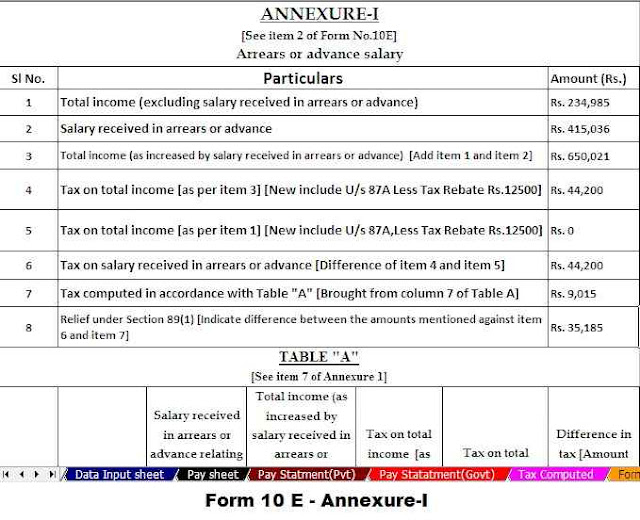
Furthermore, Form 16 integration simplifies everything. You enter details from your employer's form, and the tool generates matching computations. Consequently, filing ITR becomes straightforward. Also, it handles arrears relief under Section 89(1), a common pain point for many. Thus, you claim relief on past salary revisions effortlessly.

In addition, deduction tracking covers Chapter VI-A options, such as 80C for investments or 80D for health insurance. Moreover, it flags ineligible claims under the new regime. As a result, you avoid penalties. Besides, built-in validation checks prevent common mistakes. Hence, accuracy reaches near perfection.

Step-by-Step Download and Setup

Downloading takes minutes. First, visit trusted sites like apnataxplan.in or pranabbanerjee.com, where developers share the latest FY 2025-26 version. Click the download link for the Excel file—typically a ZIP containing the utility. Unzip it, then open in Excel 2016 or newer.

Once launched, enable macros if prompted; they power the automation. Next, input your PAN, basic details, and salary breakup. The software populates tax slabs automatically. After that, review regime comparisons and tweak deductions. Finally, generate PDF summaries or Excel reports for records. Therefore, you're ready for e-filing.

Importantly, updates ensure alignment with Income Tax Department rules. For example, it reflects AY 2026-27 changes. Thus, you future-proof your prep. Also, it's free, making it ideal for individuals in Bhubaneswar or across India.

Benefits for Salaried Users

Salaried persons save hours weekly. Specifically, automation eliminates spreadsheet formulas you once built manually. Instead, the tool does the heavy lifting. Moreover, it reduces errors by 99%, as per user feedback on similar utilities. Consequently, you focus on planning investments rather than calculations.

Furthermore, portability shines through. Carry the file on a USB or cloud drive for use anywhere. In contrast to online calculators, it works offline, protecting privacy. Therefore, sensitive salary data stays secure. Additionally, it supports pensioners and seniors with age-based rebates.

Besides, customisation options abound. Adjust for multiple employers or part-year income easily. As a result, freelancers with salary components benefit too. Hence, versatility extends its appeal widely.

How It Handles Dual Regimes

Budget changes make regime choice critical. Under the new regime, you enjoy lower slabs but limited deductions. Conversely, the old regime allows full Chapter VI-A claims. This software simulates both, displaying tax liabilities clearly. For instance, enter ₹10 lakh income; it shows ₹45,000 savings in one regime versus another.

Moreover, it highlights trade-offs. Thus, you decide based on actual numbers. In addition, Form 10E generation aids relief claims. So, even complex scenarios resolve quickly. Therefore, you optimise taxes confidently.

Common Use Cases

Government employees love its DA and HRA precision. Private sector users appreciate bonus and perquisite handling. Seniors benefit from a rebate of up to ₹12 lakh in income. Even NRIs with Indian salaries compute correctly. Consequently, it serves diverse needs.

For arrears, input revised figures; relief is calculated per the rules. Similarly, LTCG integration covers investments. Thus, holistic planning emerges. Furthermore, print-ready formats speed submissions.

Tips for Maximum Efficiency

Start early in the financial year. Update monthly salary data for projections. Regularly check for software patches on download sites. Pair it with official ITR utilities from incometax.gov.in. Therefore, seamless filing follows.

Avoid over-editing protected cells to prevent formula breaks. Save versions for scenarios. Moreover, cross-verify with AIS statements. As a result, audits pass smoothly. In addition, share with colleagues for group benefits.

Staying Compliant in FY 2025-26

Recent budgets tweaked slabs: 0-₹3 lakh nil, up to ₹4 lakh at 5%, and so on. This tool embeds these exactly. Hence, you align with CBDT notifications. Most importantly, it accurately flags surcharge and cess. Thus, penalties vanish.

Furthermore, it prepares you for presumptive taxation if you have side income. Consequently, comprehensive coverage builds confidence. So, embrace this ally today.

Download All-in-One Income Tax Preparation Software in Excel for Salaried Persons FY 2025-26 | Free Excel Tool[Prepare at a time your Tax Computed Sheet With Unique Salary Structure + Automatic Calculation of Arrears Relief U/s 89(1) with Form 10E + Automatic H.R.A Calculation U/s 10(13A) + Auto Form 16 Part A and B + Auto Form 16 Part B]

Key Features of the Excel Utility:-

This All-in-One Income Tax Preparation Software in Excel empowers salaried persons for FY 2025-26. Firstly, it automates tax slab calculations instantly as you input salary details. Consequently, you obtain precise net taxable income without manual errors.

Additionally, the tool integrates Form 16 data seamlessly. You enter employer details, and it generates matching computations immediately. Therefore, ITR filing accelerates significantly.

Moreover, it compares old and new tax regimes side-by-side. For instance, you view tax liabilities for both options clearly. Thus, you choose the optimal path effortlessly.

Furthermore, deduction tracking covers 80C investments and 80D insurance actively. The software flags ineligible claims under the new regime. As a result, you maximise savings accurately.

Besides, arrears relief under Section 89(1) computes automatically. You input revised salary figures, and relief appears precisely. Hence, past adjustments resolve quickly.

In addition, HRA exemptions and standard deductions apply flawlessly. It handles DA, bonuses, and perquisites for govt and non-govt employees. So, diverse salary structures fit perfectly.

Next, Form 10E generation simplifies relief claims. You produce reports ready for submission in moments. Importantly, built-in validations prevent common mistakes.

Also, offline portability ensures privacy everywhere. You carry the file on a USB or cloud drive securely. In contrast to online tools, data stays protected.

Finally, customisation supports multiple employers and part-year income. Seniors receive age-based rebates up to ₹12 lakh effortlessly. Therefore, versatility serves all users comprehensively.

Friday, 13 June 2025


old and new tax regime

Filing your income tax doesn’t have to be a stressful experience. Whether you're a government employee or working in the private sector, staying compliant with the latest tax laws can be time-consuming and confusing. But what if there were a tool that did it all for you?

Think of the Automatic Income Tax Preparation Software in Excel as your digital tax accountant. This all-in-one Excel utility for FY 2025-26 is designed to make income tax calculations, Form 10E, HRA exemptions, and even arrears relief U/s 89(1) simple and automatic. Whether you earn a government or private salary, this tool can take the headache out of tax time.

Table of Contents

Sr#Headings
1What is Income Tax Software in Excel?
2Why You Need This Excel-Based Tax Software?
3Who Can Use This Software?
4Key Features of the All-in-One Excel Utility
5Tax Computed Sheet as per Budget 2025
6Inbuilt Salary Structure for Govt and Non-Govt Employees
7Automatic HRA Exemption U/s 10(13A)
8Auto-Fill Salary Sheet – No More Manual Work!
9Arrears Relief Calculation U/s 89(1) with Form 10E
10Auto-Fill Form 16 (Part A and B)
11User-Friendly Interface: No Expertise Needed
12Time-Saving Benefits for Busy Professionals
13Compliance Made Easy
14How to Download and Use the Software?
15Conclusion and Final Thoughts

1. What is Income Tax Software in Excel?

Income Tax Software in Excel is a smart utility built in Microsoft Excel that helps individuals prepare and compute their income tax return without hassle. It automates various tax calculations, ensuring accuracy and compliance with the latest rules for FY 2025-26.

2. Why You Need This Excel-Based Tax Software?

Why juggle multiple spreadsheets and rules when one Excel file can handle it all? This software simplifies everything—from your salary details to Form 16 generation—saving you hours of work and reducing the chance of error.

3. Who Can Use This Software?

Whether you're a Maharashtra state government employee, a central government worker, or a private-sector employee, this tool has got you covered. Its dual salary structure means it adapts to both Govt and Non-Govt salary formats.

4. Key Features of the All-in-One Excel Utility

Here’s what makes this Excel software a must-have:

  • Automatic Tax Computation as per Budget 2025
  • Built-in salary templates
  • Auto HRA calculation under Section 10(13A)
  • Auto-filling of Form 10E for relief under Section 89(1)
  • Auto generation of Form 16 Part A and B

5. Tax Computed Sheet as per Budget 2025

The software is already updated with all the latest Budget 2025 tax slabs and rules. It allows you to choose between the old regime and new tax regime, and automatically calculates your tax liability accordingly.

6. Inbuilt Salary Structure for Govt and Non-Govt Employees

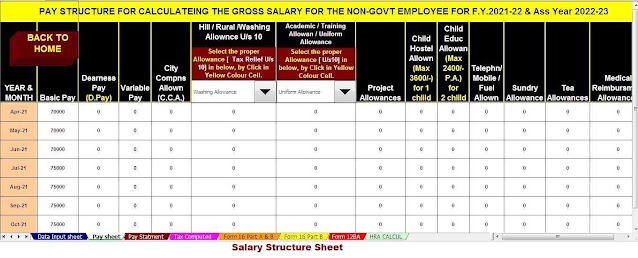
Tired of inputting your salary data from scratch? This utility has preloaded salary formats—just pick your category (Govt or Non-Govt), enter basic details, and the rest gets auto-filled.

7. Automatic HRA Exemption U/s 10(13A)

Claiming HRA can be confusing, right? The tool auto-calculates your HRA exemption based on your city of residence, rent paid, and salary details, ensuring you're not missing any benefits.

8. Auto-Fill Salary Sheet – No More Manual Work!

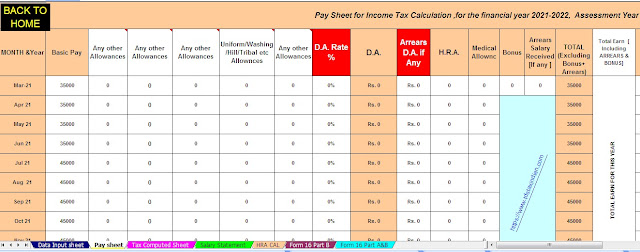
Manual data entry can lead to mistakes. This Excel tool automatically fills your salary sheet, breaking down each component like basic pay, allowances, deductions, etc., in a clear format.

9. Arrears Relief Calculation U/s 89(1) with Form 10E

Getting salary arrears? You’ll need to calculate relief under Section 89(1) and submit Form 10E. This software calculates the relief amount and fills Form 10E for you automatically.

10. Auto-Fill Form 16 (Part A and B)

Need to submit Form 16? The tool generates Form 16 Part A and B instantly. This is a lifesaver during filing season when time and accuracy are critical.

11. User-Friendly Interface: No Expertise Needed

You don’t need to be an Excel wizard. The software is designed for anyone with basic Excel knowledge. Clear instructions and dropdown options make navigation a breeze.

12. Time-Saving Benefits for Busy Professionals

This tool is like hiring a virtual assistant. Instead of wasting hours on tax calculations, you can finish everything in under 30 minutes, allowing you to focus on what really matters.

13. Compliance Made Easy

Government forms and sections can be a maze. This software keeps you 100% compliant with Income Tax Act provisions like Section 10(13A), 89(1), 80C, and more.

14. How to Download and Use the Software?

Downloading is simple; click on the download link provided below and open the Excel utility. All instructions are provided on the first sheet—just follow them step-by-step.

15. Conclusion and Final Thoughts

In today's fast-paced world, nobody wants to get stuck in endless paperwork or confusing calculations. The Automatic Income Tax Preparation Software in Excel offers a practical, reliable, and easy solution for salaried individuals—government or private—to stay compliant and save time during the FY 2025-26 tax season. It’s not just software—it’s your tax partner!

Frequently Asked Questions (FAQs)

1. Can this software be used by pensioners or senior citizens?
Yes, as long as their income sources align with the built-in formats. They can also benefit from automatic tax computation.

2. Does the software support both the Old and the New Tax Regimes?
Absolutely! You can choose your preferred regime, and it will compute tax accordingly based on the Budget 2025 updates.

3. How is this different from online tax-filing platforms?
This Excel utility gives you offline access, more control, and doesn’t require internet connectivity to work.

4. Is Form 10E submission mandatory for relief under Section 89(1)?
Yes, and this software auto-fills Form 10E, helping you stay compliant and avoid IT department notices.

Download Automatic Income Tax Preparation Software in Excel All-in-One for Govt and Non-Govt Employees with Form 10E for FY 2025-26

Download Automatic Income Tax Preparation Software in Excel All-in-One for Govt and Non-Govt Employees with Form 10E for FY 2025-26
Form 16
Form 10E

Monday, 25 October 2021


 Auto-Fill Income Tax Preparation Software in Excel for the Govt and Non- Govt Employees.Section

 10 for salaried employees under the Income-tax Act includes various allowances ranging from house

 rent and travel allowance to research / academic allowance and uniform allowance.


Salary employees receive a certain amount of money or other allowances in addition to their salary for the specific needs of the employees. Most allowances are a fraction of the total income unless they are subject to certain exemptions under the Income Tax Act. Employees are paid allowances for their services or for working in unusual circumstances.


As per Income Tax Act U/s 10 many allowances include.


Section 10 (14)

Under the Special Allowance Act of Section 10 (14), an exemption is given on the basis of the amount used by the employee for a specific purpose. Exemption depends on the following factors:


Amount of allowance.

The actual amount used for the purpose for which the allowance was granted.

Section 10 (14) (i)

Under section 10 (14) (i), a waiver is given in the amount received as allowance or in the amount spent on certain duties, which may be the figure below.

Allowances under this category are:

You may also, like- Automated Income Tax Preparation Excel Based Software All in One for the Non-Government Employees for the F.Y.2021-22[This Excel Utility can prepare at a time your Tax computed Sheet + Salary Structure as per the Non-Govt Employees Salary Pattern + Automatic Calculation House Rent Exemption U/s 10(13A) + Automatic Income Tax Form 16 Part A&B and Part B + Automatic Form 12 B.A. as per new and old tax regime] 

Auto-fill Income Tax Preparation Software

• Daily Allowance: Employees are paid daily allowance during travel or transfer time. Such allowances are paid when the employee is not in a place of normal responsibility.

Travel Allowance: Travel Allowance bears the costs related to travel or transfer while on duty. This allowance includes travel expenses when moving to another location, including packaging or transportation of a private building.


Transport Allowance: Allowance for transportation is paid to the employees in case of spending time travelling for office duties. However, the employer does not pay for travel from home to work because it is not considered an official responsibility. This allowance comes under a different category called ‘Transportation Allowance’ and it is not tax-free.


• Uniform Allowance: When the allowance is paid for the purchase or maintenance of a uniform, it must be worn while on duty. This allowance can be chosen only when the office responsibilities determine a certain uniform.

You may also, like- Automated Income Tax Preparation Excel Based Software All in One for the Assam State Government Employees for the F.Y.2021-22[This Excel Utility can prepare at a time your Tax computed Sheet + Salary Structure as per the Assam State Govt Employees Salary Pattern + Automatic Calculation House Rent Exemption U/s 10(13A) + Automatic Income Tax Form 16 Part A&B and Part B] 

Auto-fill Income Tax Preparation Software in Excel


Generally, it is not necessary to submit a statement of expenditure under this category of allowance unless the expenditure is inappropriate or unreasonable in respect of the responsibilities performed by the employee. Most of the time, you don't need to keep documentary evidence and a general declaration meets the purpose.


Section 10 (14) (ii):

Under this section, allowances are paid to employees for working under a certain condition during their tenure. The amount of discount is the amount received as allowance or the mentioned limit, whichever is less.


The types of allowances and discounts given in this section are listed below:

1. Compensation allowance for working in high altitude or hilly areas Rs.800/- p.m.

Siachen area of J&K - 7000 rupees per month

Ordinary place 1000 mtr or above - 300 rupees


2. Scheduled or Tribal or Agency Area Allowance: Rs.200 p.m.

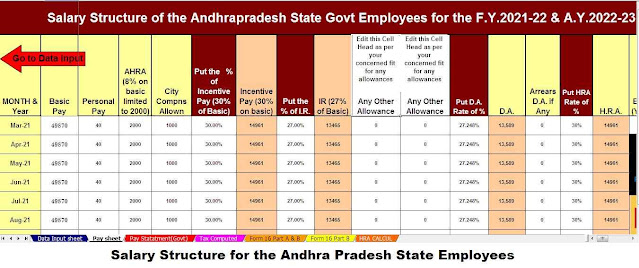
You may also, like- Automated Income Tax Preparation Excel Based Software All in One for the Andhra Pradesh State Government Employees for the F.Y.2021-22[This Excel Utility can prepare at a time your Tax computed Sheet + Salary Structure as per the Andhra Pradesh State Govt Employees Salary Pattern + Automatic Calculation House Rent Exemption U/s 10(13A) + Automatic Income Tax Form 16 Part A&B and Part B + Automatic Form 12 B.A. as per new and old tax regime] 

State of Andhra Pradesh

For duty in the border area or remotest area or any difficult/turbulent area:

Allowance from Rs.200 to Rs.1300 is exempted under Rule 2BB. 

4. Allowance for children's education:

100 for each child and a maximum of two children. 

5. Allowance for working in a transport system for personal expenses while performing duties:

70% of allowance up to Rs.10,000/- 

6. Area allowance:

Area of Nagaland, J&K, HP, UP, UP, Sikkim and Manipur - Rs.2,200 per night 

7. Allowance for hostel expenses of employee's children:

Rs.100/- in the education for each child up to two children. 

8. Allowance paid to the Armed Forces for anti-militant cases:

3900 per month. 

9. Travel allowance for physically disabled employees:

1600 per month. 

10. Transportation allowance for travel between work and accommodation:

1600 in the afternoon. 

11. Specific areas of West Bengal, North-East, Rajasthan, J&K, UP and HP - Rs.800/-

12. Island duty allowance has been provided to the Armed Forces in Andaman and Nicobar and Lakshadweep:

3250 per month. 

13. Allowance for working in underground mines:

800 per month. 

14. Special Compensatory Highly Active Area Allowance:

200200 in the afternoon. 

15. Allowance for Armed Forces at High Altitude:

9000 - 15,000ft - Rs.1060 pm

15,000 feet above - 1600 pm

Download Automated Income Tax Preparation Excel Based Software All in One for the Government and Non-Government(Private) Employees for the Financial Year 2021-22 and Assessment Year 2022-23U/s 115BAC


Salary Structure for Govt and Non-Govt Employee

Income Tax Form 10 E

Feature of this Excel Utility:-


1) This Excel Utility Prepare Your Income Tax as per your option U/s 115BAC perfectly.


2) This Excel Utility has all amended Income Tax Section as per Budget 2021


3) Automated Income Tax Arrears Relief Calculator U/s 89(1) with Form 10E from the F.Y.2000-01 to F.Y.2021-22 (Updated Version)


4) Automated Calculation Income Tax House Rent Exemption U/s 10(13A)


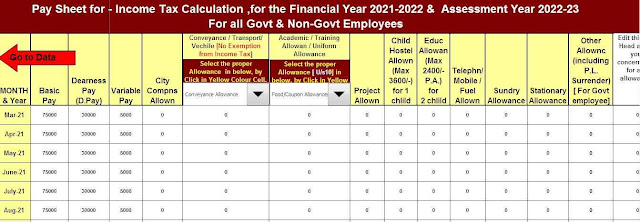
5) Individual Salary Structure as per the Govt and Private Concern’s Salary Pattern


6) Individual Salary Sheet


7) Individual Tax Computed Sheet


8) Automated Income Tax Revised Form 16 Part A&B for the F.Y.2021-22


9) Automated Income Tax Revised Form 16 Part B for the F.Y.2021-22


10) Automatic Convert the amount in to the in-words without any Excel Formula