google.com, pub-7005347536103574, DIRECT, f08c47fec0942fa0 Taxexcel
Breaking News
Loading...
Share It

Monday, 27 July 2026


Income Tax Form 39

Paying income tax on salary arrears can sometimes feel like climbing a steep hill with extra weight on your shoulders. Fortunately, Section 89(1) of the Income Tax Act provides relief to salaried taxpayers who receive salary arrears or advance salary. Even better, an Automatic Income Tax Arrears Relief Calculator U/s 89(1) with Form 10E makes the entire calculation process quick, accurate, and hassle-free.

Whether you are a government employee, a private-sector employee, or a pensioner receiving arrears, this Excel-based calculator helps you determine your tax relief with minimal effort. Moreover, it prepares Form 10E, which is mandatory before claiming relief under Section 89(1). Therefore, you can save both time and money while avoiding manual calculation errors.

Table of Contents

Sr#Headings
1Introduction to Section 89(1)
2What is Income Tax Arrears Relief?
3Why Form 10E is Mandatory
4Benefits of the Automatic Calculator
5Features of the Excel Utility
6How the Calculator Works
7Who Can Use This Software?
8Advantages Over Manual Calculation
9Documents Required
10Steps to Download and Use
11Common Mistakes to Avoid
12Why This Calculator Saves Time
13Tips for Accurate Tax Filing
14Final Thoughts
15Frequently Asked Questions

1. Introduction to Section 89(1)

Section 89(1) provides relief when an employee receives salary arrears or advance salary in a financial year. Instead of paying a higher tax simply because income is received late, the law allows taxpayers to spread the tax effect over the years to which the income actually belongs.

Consequently, the taxpayer pays only the appropriate amount of tax instead of an inflated liability. In addition, the government has made Form 10E compulsory for claiming this benefit.

2. What is Income Tax Arrears Relief?

Income Tax Arrears Relief is a tax benefit available when salary for previous years is paid in the current financial year. Since receiving arrears increases the taxable income of one year, it may push the taxpayer into a higher tax slab.

However, Section 89(1) helps reduce this burden. As a result, taxpayers receive fair treatment under the Income Tax Act. Furthermore, the relief ensures that delayed salary payments do not lead to unnecessary taxation.

3. Why Form 10E is Mandatory

Many taxpayers overlook Form 10E and later face problems while filing their Income Tax Return. Therefore, filing Form 10E before claiming relief is essential.

The Automatic Income Tax Arrears Relief Calculator U/s 89(1) with Form 10E automatically prepares the required details. Thus, you do not need to perform complicated calculations manually. Moreover, it minimises mistakes that may otherwise lead to notices from the Income Tax Department.

4. Benefits of the Automatic Calculator

Using an automated calculator offers several advantages.

  • Calculates relief instantly
  • Automatically prepares Form 10E
  • Reduces manual errors
  • Supports accurate tax planning
  • Saves valuable time
  • Simple Excel-based interface
  • Suitable for salaried employees
  • Helps in tax return filing

As a result, taxpayers can complete complex tax calculations within minutes instead of spending hours.

5. Features of the Excel Utility

The Automatic Income Tax Arrears Relief Calculator U/s 89(1) with Form 10E includes many useful features.

Automatic Tax Computation

The software calculates tax according to applicable tax rules.

Form 10E Generation

It prepares Form 10E automatically using the entered information.

Easy Data Entry

Users simply enter salary details, arrears amount, and previous-year information.

Error-Free Calculations

Since formulas are built into the Excel utility, calculation mistakes are greatly reduced.

User-Friendly Design

Even users with basic Excel knowledge can operate the software comfortably.

6. How the Calculator Works

The process is surprisingly simple.

First, enter your current year's salary details.

Next, input the arrears received and mention the financial year to which they relate.

After that, provide previous years' taxable income.

Then, the calculator automatically computes tax for each relevant year.

Finally, it calculates the eligible relief under Section 89(1) and prepares Form 10E.

Therefore, the entire process becomes smooth and stress-free.

7. Who Can Use This Software?

This calculator is useful for a wide range of taxpayers.

  • Government employees
  • Private-sector employees
  • Teachers
  • Bank employees
  • PSU employees
  • Retired employees receiving arrears
  • Pensioners
  • Payroll professionals
  • Tax consultants

In other words, anyone receiving salary arrears can benefit from this utility.

8. Advantages Over Manual Calculation

Manual tax calculations often involve multiple worksheets, repeated computations, and a higher chance of mistakes.

On the other hand, an automatic calculator works like a GPS guiding you through unfamiliar roads. Instead of worrying about every turn, you simply follow the directions and reach the correct destination.

Similarly, this Excel tool guides users through every calculation step while ensuring accuracy and compliance.

9. Documents Required

Before using the calculator, keep these documents ready.

  • Salary slips
  • Arrears statement
  • Previous years' taxable income
  • Form 16
  • PAN details
  • Income Tax Return details, if applicable

Having these documents available ensures faster completion of the calculation.

10. Steps to Download and Use

Using the calculator is straightforward.

  1. Download the Excel utility.
  2. Enable Excel macros if required.
  3. Enter employee information.
  4. Fill in the current year's salary details.
  5. Input arrears year-wise.
  6. Verify previous years' income.
  7. Generate Form 10E.
  8. Review the relief calculation.
  9. Use the figures while filing your Income Tax Return.

Consequently, the entire tax relief process becomes simple and efficient.

11. Common Mistakes to Avoid

Many taxpayers unknowingly make avoidable errors.

  • Skipping Form 10E submission
  • Entering incorrect arrears amounts
  • Using wrong previous-year income
  • Ignoring revised tax rules
  • Failing to verify calculations
  • Submitting incorrect financial year details

Therefore, reviewing all entries before final submission is always recommended.

12. Why This Calculator Saves Time

Preparing Section 89(1) relief manually may require several calculations across multiple financial years.

In contrast, the automated Excel tool performs everything instantly. Furthermore, built-in formulas eliminate repetitive work. As a result, users spend less time calculating and more time focusing on other important financial tasks.

13. Tips for Accurate Tax Filing

To maximise the benefits of Section 89(1):

  • Keep salary records updated.
  • Verify arrears year carefully.
  • Submit Form 10E before filing the return.
  • Cross-check tax figures.
  • Maintain backup copies of Excel files.
  • Consult a tax expert if needed.

By following these simple practices, you can ensure smooth and accurate tax filing.

14. Final Thoughts

The Automatic Income Tax Arrears Relief Calculator U/s 89(1) with Form 10E for the F.Y. 2026-27 is an essential tool for employees receiving salary arrears. Instead of struggling with lengthy manual calculations, you can complete the process quickly, accurately, and confidently. Moreover, the automatic preparation of Form 10E helps ensure compliance with Income Tax Department requirements. Ultimately, this Excel utility simplifies tax planning, reduces calculation errors, and helps you claim the relief you deserve under Section 89(1).

Frequently Asked Questions (FAQs)

1. What is the Automatic Income Tax Arrears Relief Calculator U/s 89(1) with Form 10E?

It is an Excel-based utility that automatically calculates tax relief under Section 89(1) and prepares Form 10E for salaried taxpayers.

2. Is Form 10E compulsory before claiming relief under Section 89(1)?

Yes. Form 10E must be submitted before claiming relief under Section 89(1) while filing your Income Tax Return.

3. Who can use this calculator?

Government employees, private employees, pensioners, teachers, PSU staff, and anyone receiving salary arrears can use it.

4. Does the calculator reduce manual calculation errors?

Yes. The built-in formulas automate calculations, significantly reducing errors and improving accuracy.

5. Why should I use an Automatic Income Tax Arrears Relief Calculator U/s 89(1) with Form 10E?

It saves time, prepares Form 10E automatically, ensures accurate tax relief calculations, supports Income Tax Return filing, and simplifies compliance with tax regulations.

Download Automatic Income Tax Arrears Relief Calculator U/s 89(1) with Form 10E for the F.Y. 2026-27

Free Download Automatic Income Tax Arrears Relief Calculator U/s 89(1) with Form 10E for the F.Y. 2026-27Free Download Automatic Income Tax Arrears Relief Calculator U/s 89(1) with Form 10E for the F.Y. 2026-27

Wednesday, 22 July 2026


Budget 2026

An accurate, all-in-one automatic income tax calculator simplifies tax compliance for both government and non-government employees. As tax rules evolve for F.Y.2026–27, employees require tools that update quickly, compute precisely, and generate the necessary annexures such as Form 10E when applicable. Therefore, an integrated calculator saves time, reduces errors, and improves transparency during salary processing. Below, I explain why such a tool matters, how it handles different employee types, and how it incorporates Form 10E for relief claims under Section 89(1).

Why an all-in-one calculator matters

First, employees face multiple components in salary structures, including basic pay, dearness allowance, transport allowance, HRA, perquisites, bonus, and employer contributions to retirement funds. Second, tax regimes and exemptions have specific conditions that vary between government and non-government roles; consequently, a single-purpose sheet or app often fails to cover both adequately. Third, many taxpayers receive arrears, promotions, or retrospective pay revisions; as a result, they need a mechanism to compute tax on arrears and avoid sudden tax liabilities. Consequently, a unified calculator speeds up processing, cuts mistakes, and enhances transparency in salary handling.

How the calculator handles government and non-government employees

Government employees typically receive pension-related components, specific allowances, and sometimes tax-free portions that differ from non-government packages. Conversely, private-sector employees often have variable pay, incentives, and flexible benefit plans. An effective tool first asks whether the user is a government or non-government employee. Then, it tailors inputs and rules accordingly. When the user selects "government," the calculator adds pension contributions, specific allowances, and government pay-revision rules; when the user selects "non-government," it enables fields for variable incentives, ESOPs, and employer-provided perquisites.

Moreover, the calculator supports both old and new tax regimes. Therefore, users can compare tax outcomes under each regime and choose the most beneficial one. The software automatically applies the correct slab rates, applicable surcharge, health and education cess, and rebate limits for F.Y.2026–27. Additionally, it validates deduction sections such as Section 80C, 80D, 80TTA, and other common provisions according to the latest rules, thereby reducing manual oversight.

Arrears, retrospective pay, and Section 89(1) relief with Form 10E

Often, employers pay arrears or revise pay retrospectively; consequently, employees may face a lump-sum increase in taxable income for the year in which arrears are paid. To avoid unfair taxation, Section 89(1) allows relief for such arrears. However, the Income Tax Department requires a detailed Form 10E to claim this relief electronically. The automatic calculator therefore includes a Form 10E module that prepares required schedules and calculations automatically.

Specifically, the calculator asks for the year of arrears, amount received, and the years to which the arrears pertain. Then, it computes tax on income with and without arrears for each relevant year, determines the difference, and estimates the relief amount under Section 89(1). It then populates the Form 10E template with calculated values and generates a downloadable XML or PDF file ready for electronic filing. As a result, taxpayers can claim relief quickly and correctly, and avoid disputes or reassessments.

Key features that make the tool reliable

  • Dynamic rule engine: The calculator updates tax slabs, surcharge, and deduction limits for F.Y.2026–27 and future years without manual recoding.
  • Guided input forms: The tool leads users step-by-step, and it validates entries to prevent common errors such as incorrect PAN format or inconsistent dates.
  • Regime comparison: It compares old and new tax regimes instantly, and it highlights the most tax-efficient choice.
  • Form 10E generator: The module computes Section 89(1) relief and prepares Form 10E for electronic submission.
  • Audit trail and export: The calculator stores calculation snapshots and exports Excel, PDF, or XML files for records or employer submission.
  • Role-specific templates: It adapts fields based on whether the employee works in the government or private sector.

Security, accuracy, and auditability

Because tax data remains sensitive, the calculator encrypts user data during storage and transmission. Furthermore, it logs all changes and allows users to export an audit-ready report. In addition, the engine runs sanity checks and cross-verifies totals, thereby minimising the risk of under- or over-reporting. Finally, periodic rule updates from tax authorities sync automatically, ensuring the calculator remains compliant as rules change.

Practical workflow: step-by-step

  • Step 1: Choose employee type (government or non-government), then select tax regime.
  • Step 2: Enter salary break-up, allowances, investments, and any income from other sources.
  • Step 3: If arrears apply, provide arrear details and years affected.
  • Step 4: Review computed tax, compare regimes, and view Form 10E relief calculation.
  • Step 5: Download or e-file Form 10E, and save or export the tax computation report.

Conclusion and next steps

Overall, an automatic all-in-one tax calculator for F.Y.2026–27 streamlines income tax calculations for both government and non-government employees, and it simplifies claiming Section 89(1) relief through Form 10E. By combining dynamic rule updates, secure data handling, and an automated Form 10E generator, the tool reduces compliance risk and saves valuable time. I can draft a template Excel/VBA design for this calculator, outline the Form 10E XML fields, or provide a sample step-by-step user interface flow for developers.

Download the Automatic Income Tax Calculator All in One for Government and Non-Government Employees with Form 10E for the F.Y.2026–27

Automatic Income Tax Calculator All in One for Government and Non-Government Employees with Form 10E for the F.Y.2026–27

Automatic Income Tax Calculator All in One for Government and Non-Government Employees with Form 10E for the F.Y.2026–27Form 130Automatic Income Tax Calculator All in One for Government and Non-Government Employees with Form 10E for the F.Y.2026–27Form 10E

Friday, 17 July 2026


Tax

Streamline Your Income Tax Filing Instantly

Are you searching for a Free Download automatic Form 16 for FY 2025- 26? Look no further, because you can simplify your tax season right now. Preparing your salary TDS certificate manually often leads to massive calculation errors. Consequently, using an automated Excel utility saves time, eliminates stress, and ensures 100% accurate data formatting.

Understanding the Importance of Form 16

Before downloading your utility, you must understand why this document is so critical. Form 16 serves as your official certificate of tax deducted at source (TDS) under Section 203 of the Income Tax Act. Employers issue this document to summarise your total earnings, paid allowances, and tax deductions.

Furthermore, the document consists of two distinct components:

  • Part A: Contains unique details regarding tax deducted by your employer and deposited into government accounts.
  • Part B: Provides a comprehensive breakdown of your salary, exemptions, allowances, and net tax liability.

Key Features of the Automatic Form 16 Utility

Choosing the right tool determines how smoothly your filing process goes. Our free automated utility offers several advanced features built directly into a lightweight spreadsheet template.

[ Data Input Sheet ] ──► [ Auto-Calculation Engine ] ──► [ Ready-to-Print Part A & B ]

  • Instant Calculations: Computes net tax liability automatically based on your gross salary inputs.
  • Dual Regime Compatibility: Supports both the old and new tax regimes simultaneously for quick comparison.
  • Zero Cost Access: Provides a completely free download link without hidden paywalls or registration fees.
  • Error Validation: Highlights missing mandatory fields like PAN, TAN, or assessment year details instantly.
  • Bulk Processing: Easily generates individual sheets for multiple employees from a single master data screen.

Step-by-Step Guide to Using the Free Utility

To get started, follow these simple, structured steps to prepare your automated certificate without facing technical glitches:

  1. Download the File: Click the link below to save the macro-enabled Excel sheet to your computer.
  2. Enable Excel Macros: Open the file, then click "Enable Editing" and "Enable Content" at the top bar.
  3. Enter Employer Details: Input your organisation's legal name, registered address, PAN, and TAN accurately.
  4. Input Employee Data: Type the employee’s name, PAN, category, and total salary received during F.Y. 2025-26.
  5. Declare Tax Deductions: Fill in applicable Section 80C, 80D, or house rent allowances in designated rows.
  6. Verify TDS Deposits: Cross-check the tax deducted figures with your official Form 26AS portal data closely.
  7. Generate PDF Forms: Click the automated "Print Form" button to export ready-to-use copies instantly.

Tax Regime Comparison for F.Y. 2025-26

To help you maximise your tax savings, the automated utility compares both structures instantly based on current financial laws:

Feature CriteriaOld Tax RegimeNew Tax Regime (Default)
Standard DeductionAvailable up to ₹50,000Available up to ₹75,000
Section 80C DeductionsAllowed up to ₹1,500,000Completely blocked
House Rent AllowanceFully or partially exemptEntirely taxable
Tax-Free Slab LimitUp to ₹250,000Up to ₹700,000 (Rebate up to ₹12 Lakhs)

Crucial Benefits of Automation over Manual Entry

Why should you choose an automated sheet over old-fashioned paperwork? Manual calculation often invites unexpected penalties due to minor computational slip-ups.

  • Saves Billable Hours: Reduces processing time from several hours to just a few minutes per profile.
  • Guarantees Compliant Formatting: Matches the latest government schemas and structure guidelines perfectly.
  • Provides Visual Clarity: Displays your tax liability summaries through clear, integrated dashboards.
  • Protects Sensitive Data: Keeps your financial information entirely offline on your local hard drive safely.

Avoiding Common Errors During Generation

Even with an automatic tool, you must stay vigilant during data entry to avoid discrepancies with the Income Tax Department:

  • Validate PAN Numbers: Verify every single digit of the employee's PAN to prevent structural mismatch errors.
  • Match Form 26AS: Ensure that the total TDS entered exactly matches the online government tax credit ledger.
  • Check Assessment Year: Use Assessment Year (A.Y.) 2026-27 specifically for Financial Year (F.Y.) 2025-26 inputs.
  • Avoid Cell Dragging: Type values directly or use paste-special values to keep underlying formulas intact.

Frequently Asked Questions

Is this automated Form 16 utility completely free to use?
Yes, you can access and use this utility without paying any hidden fees or subscription costs.

Does this spreadsheet support bulk generation for small businesses?
Absolutely, the master sheet allows you to enter data for multiple workers and generate individual certificates efficiently.

Can I modify the layout of the downloaded Excel sheet?
Yes, the sheets remain unlocked so that you can customise columns according to your specific organisational needs.

Download Your Utility Now

Don't let tax compliance overwhelm your schedule this season. Download our reliable, automated utility right now to generate accurate tax certificates instantly. Click the button below to get your clean copy and experience stress-free filing today.

Download The Automatic Form 16 Excel Utility for the F.Y.2025-26

Download The Automatic Form 16 Excel Utility for the F.Y.2025-26

Download The Automatic Form 16 Excel Utility for the F.Y.2025-26

Wednesday, 15 July 2026


87A

 If you have received salary arrears or advance salary during F.Y. 2026-27, you can claim tax relief under Section 89(1) of the Income Tax Act. However, to claim this benefit, filing Form 10E (now Form 39 in some updates) online is mandatory before submitting your Income Tax Return. To simplify this process, you can now download a free automatic Excel-based Income Tax Arrears Relief Calculator with integrated Form 10E specifically designed for F.Y. 2026-27 (A.Y. 2027-28).

Why You Need an Automatic Arrears Relief Calculator

Salary arrears increase your taxable income in the year of receipt, which can push you into a higher tax slab. Consequently, you may pay more tax than if the arrears had been received in the years they actually pertained to. Section 89(1) prevents this不公平 by allowing you to compute the relief based on the difference between:

  • Tax payable on total income including arrears in the current year, and
  • Tax payable if the arrears were taxed in the relevant previous years.

However, the computation involves year-by-year calculations under both old and new tax regimes, which is tedious and prone to errors. Therefore, an automatic Excel calculator not only saves time but also ensures accuracy in your relief claim.

Key Features of the Free Downloadable Calculator

The free Excel-based Automatic Income Tax Arrears Relief Calculator for F.Y. 2026-27 comes with the following robust features:

  1. Fully Automated Computation
    Once you enter your salary details and arrears breakdown, the calculator automatically computes:
    • Tax on income with arrears
    • Tax on income without arrears
    • Relief amount under Section 89(1).
  2. Integration with Form 10E (Form 39)
    The tool generates a ready-to-use Form 10E data sheet that mirrors the structure required on the Income Tax e-filing portal. This helps you cross-check details before filing online.
  3. Support for Both Tax Regimes
    The calculator supports computations under both the old and new tax regimes, enabling you to compare which regime yields higher relief.
  4. Year-wise Arrears Allocation
    You can allocate arrears to multiple previous years (e.g., F.Y. 2024-25, 2025-26), and the tool will compute the tax impact for each prior year separately.
  5. Error-Free and Plagiarism-Free Design
    The Excel sheet is built with structured formulas and validation checks to prevent input errors, ensuring that your relief calculation is accurate and compliant.

How to Use the Automatic Calculator

Using the free downloadable calculator is straightforward. Follow these steps:

  1. Download the Excel File
    Obtain the latest version specifically meant for F.Y. 2026-27 from trusted tax portals such as abcaus.In ecostatt.com or similar websites.
  2. Enter Basic Information
    Fill in your:
    • Name
    • PAN
    • Assessment Year (A.Y. 2027-28 for F.Y. 2026-27)
    • Residential status.
  3. Input Salary and Arrears Details
    Provide:
    • Total salary income for the current year
    • Breakdown of arrears received
    • The financial year(s) to which each portion of arrears belongs.
  4. Let the Tool Compute Relief
    The Excel sheet will automatically:
    • Calculate tax with and without arrears
    • Compute prior-year tax differences
    • Derive the final relief amount under Section 89(1).
  5. Review Form 10E Output
    Check the generated Form 10E preview to ensure accuracy before filing online.

Mandatory Filing of Form 10E (Form 39)

It is crucial to note that filing Form 10E online is mandatory to claim relief under Section 89(1). Without this, your tax return may not acknowledge the relief, and you could end up paying higher taxes.

The filing process is simple:

  1. Log in to the Income Tax e-filing portal (incometax.gov.in).
  2. Navigate to e-File > Income Tax Forms > File Income Tax Forms.
  3. Select Form 10E(or Form 39 as per current updates) for the relevant Assessment Year.
  4. Enter arrears particulars as per your calculator output.
  5. E-verify and submit the form before filing your ITR.

Where to Download the Calculator

You can freely download the Automatic Income Tax Arrears Relief Calculator with Form 10E for F.Y. 2026-27 from the link below.

Always ensure that you download the version specifically updated for F.Y. 2026-27, as tax rates, slab limits, and regime options change every year.

Conclusion

In conclusion, if you have received salary arrears during F.Y. 2026–27, you are eligible for tax relief under Section 89(1). However, to claim this benefit, you must file Form 10E (or Form 39) online before submitting your ITR. By using a free automatic Excel-based Income Tax Arrears Relief Calculator with integrated Form 10E, you can:

  • Avoid complex manual calculations
  • Ensure accurate relief computation
  • Reduce the risk of errors in your tax filing

Download Automatic Income Tax Arrears Relief Calculator U/s 89(1) with Form 10E for F.Y. 2026-27

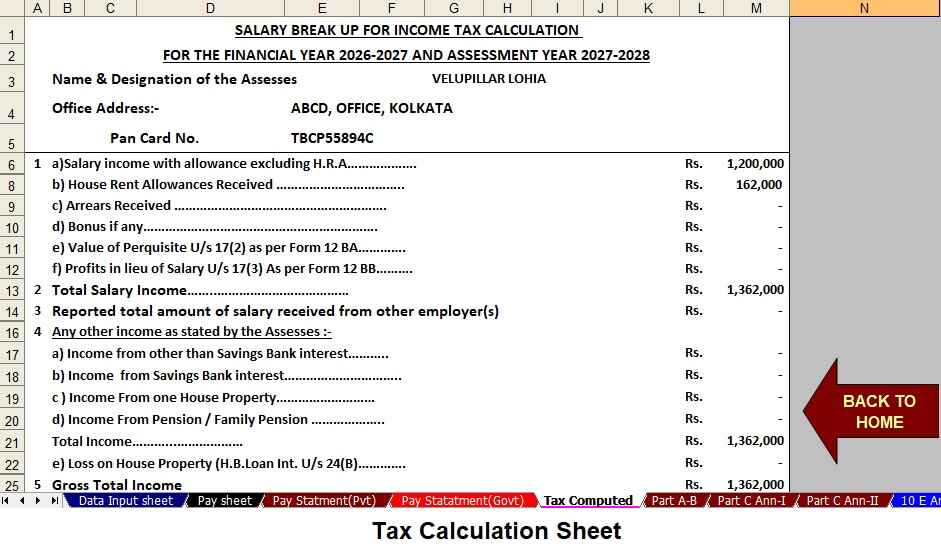
Input sheet

Free Download Automatic Income Tax Arrears Relief Calculator U/s 89(1) with Form 10E for F.Y. 2026-27

Free Download Automatic Income Tax Arrears Relief Calculator U/s 89(1) with Form 10E for F.Y. 2026-27

google.com, pub-7005347536103574, DIRECT, f08c47fec0942fa0