google.com, pub-7005347536103574, DIRECT, f08c47fec0942fa0 Taxexcel
Breaking News
Loading...
Share It

Wednesday, 27 September 2023


Introduction

Download Auto Calculate Income Tax Preparation Software. We're excited to introduce our new

 income tax software for government and non-government employees. With the new financial year

 2023-24 approaching, it's essential to have a tool that makes income tax calculations easier. In this

 guide, we'll explain why our Income Tax Software in Excel is the best choice for all kinds of

 employees.

Simplifying Income Tax

A Game-Changing Tool

Our Income Tax Software in Excel is not your ordinary software. It's designed to make income tax

 calculations easy for everyone. Download Auto Calculate Income Tax Preparation Software. Whether

 you work for the government or in the private sector, this software can help you accurately calculate

 your taxes.

Key Features

  1. Easy to Use

Our software is designed to be user-friendly. Even if you're not a tax expert, you can use it with ease.

  1. Automatic Calculations

Our software uses advanced math to do all the tax calculations for you. No more worrying about making mistakes – just enter your financial info, and let the software do the rest.

  1. Works with Excel

Our software is compatible with Microsoft Excel, which makes it convenient if you're already familiar

 with Excel. You can easily move data in and out, making tax prep a breeze.

Who Can Benefit?

Our Income Tax Software in Excel is useful for:

Government Workers

Government employees often have complex finances with lots of deductions. Our software is built to

 handle these complexities and ensure your taxes are correct.

Private Sector & Self-Employed

If you work in the private sector or for yourself, our software is here to help. It adapts to different

 income sources and helps you save money on taxes.

Why Choose Our Software?

Accuracy Guaranteed

Our software does all the calculations for you, so there's no room for mistakes. You can trust that your

 tax returns will be perfect.

Saves Time

Our software is quick and easy to use. You can finish your taxes in less time than doing them by hand.

Maximize Savings

Our software not only calculates your taxes but also finds ways for you to save money legally.

How to Get Started

  1. Download the software from the link below.
  2. Install it on your computer.
  3. Enter your financial info.
  4. Let the software do its work.
  5. Review and file your tax returns with confidence.

Conclusion

With the new financial year approaching, it's time to get ready for tax season. Our Income Tax Software

 in Excel is the perfect tool for government and non-government employees. It's user-friendly, fast, and

 works with Excel. Don't miss out on making tax season easier and saving money. Download our

 software now and take control of your finances!

Get Auto Income Tax Software in Excel for Government & Non-Government Workers for 2023-24 as per Budget 2023

Download Auto Calculate Income Tax Preparation Software in Excel
Income Tax Form 10E

Features of this Excel Utility:

  1. This Excel utility calculates your income tax according to the New Section 115 BAC (New and Old Tax Regime).
  2. You can choose between the New or Old Tax Regime.
  3. It has a unique Salary Structure for Government and Non-Government Employees.
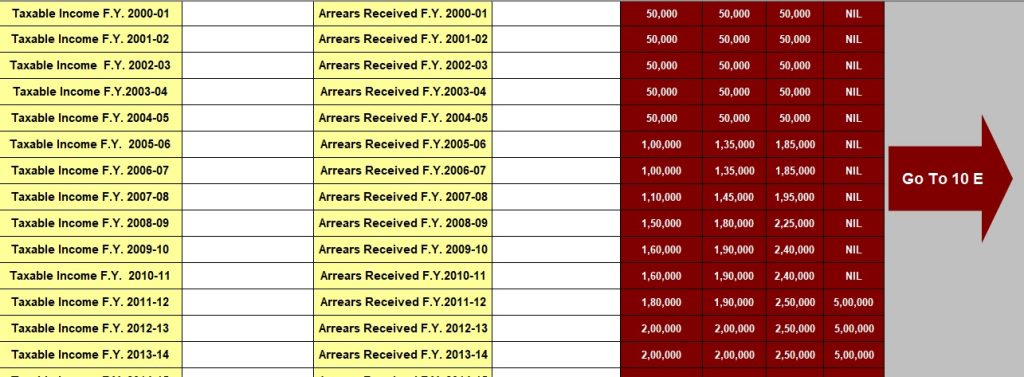
  4. It includes an Automated Income Tax Arrears Relief Calculator U/s 89(1) with Form 10E from F.Y. 2000-01 to F.Y. 2023-24 (Update Version).
  5. Automated Income Tax Revised Form 16 Part A&B for F.Y. 2023-24 is included.
  6. It also includes Automated Income Tax Revised Form 16 Part B for F.Y. 2023-24.

Tuesday, 26 September 2023


Income Tax

The Tax Arrears Relief Calculator for 2023-24 is here to help you with your tax problems. It's easy to

 use and can make a big difference.

What's Tax Arrears Relief?

When you owe taxes from past years, that's tax arrears. Form 10E, given by the Indian Income Tax Department, can help you out.

What's Form 10E?

Form 10E is a paper that helps you ask for relief from tax arrears, as per the Income Tax Act, 1961.

Why Use a Tax Arrears Relief Calculator?

This calculator is handy because it's:

Accurate and Quick

It gives you the right relief amount by looking at your income and arrears. No more guessing.

Saves Time

Instead of doing the math yourself, let the calculator do it for you. It's fast and prevents mistakes.

Follows the Law

The calculator keeps you on the right side of tax laws. No trouble with the authorities.

How to Use the Tax Arrears Relief Calculator

It's simple:

  1. Put in Your Money Info: Enter your income and arrears.
  2. Pick the Right Year: Choose the year you need relief for.
  3. Get the Answer: Click 'Calculate' to find out your relief amount.
  4. Claim Your Relief: Use this info to ask for your tax relief.

In Conclusion

The Tax Arrears Relief Calculator for 2023-24 can help you fix your tax issues and secure your money.

 It's accurate, fast, and keeps you out of trouble. Don't let tax problems stress you; use this tool and take

 control of your finances.

Download Automated Income Tax Arrears Relief Calculator U/s 89(1) From the Financial Year 2000-01 to Financial Year 2023-24 in Excel

Tax Arrears Relief Calculator for 2023-24
Income Tax Form 10E

Monday, 25 September 2023

 In today's fast-paced world, tax planning is a crucial aspect of financial management. As a responsible

 taxpayer, you're always on the lookout for ways to minimize your tax liability while complying with 

the law. The introduction of the new tax regime in recent years has brought about significant changes in how taxpayers approach their tax planning strategies. Therefore, One of the key components of this new 

regime is the Standard Deduction of Rs. 50,000/-. In this article, we will delve into how choosing the

 Standard Deduction can provide substantial benefits to taxpayers.

Understanding the Standard Deduction

What is the Standard Deduction?

In other words, The Standard Deduction is a fixed amount subtracted from your taxable income, reducing the total income subject to taxation. However, In the context of the new tax regime, it offers taxpayers an alternative to the conventional system of claiming deductions under various sections of the Income Tax Act.

How Does it Work?

When you opt for the new tax regime, you forego most deductions and exemptions, simplifying the tax calculation process. However, the government still provides a Standard Deduction of Rs. 50,000/- to all taxpayers, In addition,  irrespective of their income sources.

After that, the Benefits of Choosing Standard Deduction

1. Simplified Tax Planning

After that, With the Standard Deduction, tax planning becomes more straightforward. Similarly, You don't need to keep track of multiple deductions and exemptions, making it an attractive option for those seeking simplicity in their financial affairs.

2. Universality

However, The Standard Deduction of Rs. 50,000/- is available to all taxpayers, ensuring that everyone can benefit from this provision. Whether you are a salaried individual, a business owner, or a freelancer, you can claim this deduction.

3. Reducing Taxable Income

Therefore, By choosing the Standard Deduction, you reduce your taxable income by Rs. 50,000/-. This can lead to substantial tax savings, especially for individuals in lower tax brackets.

Who Can Opt for the Standard Deduction?

Above all, The Standard Deduction of Rs. 50,000/- is available to individual taxpayers, In addition,  Hindu Undivided Families (HUFs), and senior citizens. It is important to note that the option to select the Standard Deduction is available in the new tax regime introduced in the financial year 2020-21. Taxpayers can choose between the old and new tax regimes based on their financial situation and preferences.

Making the Right Choice

Consider Your Deductions

Before making a decision, it's essential to consider your existing deductions. In addition, If you have substantial deductions under various sections of the Income Tax Act, sticking to the old regime may be more advantageous. However, if you find that the Standard Deduction of Rs. 50,000/- is sufficient to cover your deductions, the new regime could be a simpler and more tax-efficient option.

Consult a Tax Professional

Above all, Taxation can be complex, and the best choice depends on your unique financial circumstances. It's always a good idea to consult with a tax professional who can provide personalized advice tailored to your needs.

Conclusion

In conclusion, the Standard Deduction of Rs. 50,000/- can be a valuable tool in your tax planning arsenal, especially if you are inclined towards the new tax regime. By choosing this deduction, you not only simplify your tax affairs but also enjoy the benefit of reduced taxable income. However, the decision to opt for the Standard Deduction should be made after careful consideration of your specific financial situation and the deductions you currently claim.

FAQs

1. Is the Standard Deduction available to all taxpayers?

  • Yes, the Standard Deduction of Rs. 50,000/- is available to individual taxpayers, Hindu Undivided Families (HUFs), and senior citizens in the new tax regime.

2. Can I switch between the old and new tax regimes every year?

  • Yes, taxpayers have the flexibility to choose between the old and new tax regimes each year, depending on their financial circumstances.

3. How do I claim the Standard Deduction when filing my taxes?

  • When filing your taxes under the new tax regime, you can simply deduct Rs. 50,000/- from your total taxable income.

4. Are there any other deductions available in the new tax regime?

  • The new tax regime offers limited deductions and exemptions compared to the old regime. Taxpayers should carefully evaluate which regime suits their needs better.

5. Can I claim the Standard Deduction if I have business income?

  • Yes, the Standard Deduction is available to all types of taxpayers, including those with business income, provided they are filing under the new tax regime.

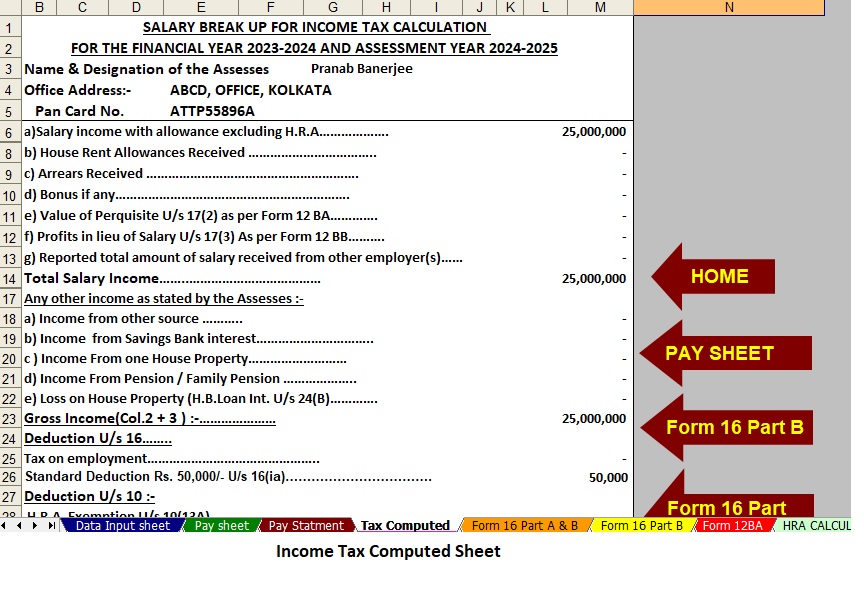
Download Automated Income Tax Preparation Excel-Based Software All in One for the Non-Government (Private) Employees for the F.Y.2023-24 and A.Y.2024-25

Standard Deduction Rs.50000/-Tax Benefits in the New Regime
Income Tax form 16

Features of this Excel Utility

  1. The Tax Calculation will be as per the Budget 2023 with New and Old Tax Regime U/s 115 BAC
  2. This Excel Utility has its own Salary Structure as per the Non-Government (Private) Employees' Salary Structure
  3. This Excel Utility can prepare automatically your Income tax Computed  Sheet  Just fill in the Data
  4. This Excel Utility can Calculate your House Rent Exemption U/s 10(13A)
  5. For instance, This Excel Utility have a separate Salary Sheet
  6. For instance, This Excel Utility automatically your Arrears Relief Calculation U/s 89(1) with Form 10E
  7. This Excel Utility can prepare at a time your Form 16 Part B automatically
  8. This Excel Utility can prepare at a time Form 16 Part A and B 

Thursday, 15 June 2023

  How do file 10E in the new Incomet ax portal? Filing income tax returns is an important responsibility

 for every income earner in India. It is a legal requirement to ensure that the government accurately

 assesses the tax liability of individuals and to prevent tax evasion. We discuss how to file Form 10E on

 the new income tax portal.


With the introduction of the Income Tax Portal in 2021, tax returns have become faster and more efficient.


What is Form 10E?


Income Tax Form 10E is a declaration form that must be filed by individuals who want to claim a deduction for debts incurred in the current financial year or salary for the past Financial year. This form 10E is a must filing under Section 89(1) of the Income Tax Act, 1961. It can be filled by salaried persons, pensioners, or other persons who have received a salary or received a salary in the previous year.


A step-by-step guide to filling Form 10E on the new Income Tax Portal


Step 1: First go through the login to the  new Income Tax portal and log in with your Pan or Adhaar number and proper password


Step 2: Go to the "E-File" section

Once you are logged in to the portal, go to the 'e-File' section in the assortment.


Step 3: Click on 'Income Tax Forms and find the Form 10E in the "E-File Section"


How do file 10E in the new income tax portal?

Step 4: Select Form 10E

Select Form 10E from the list of forms listed on the page in the Income Tax Forms section.


Step 5: Fill in the required details

After selecting Form 10E, you will be redirected to a page where you have to fill in the requested information. These details include your name, PAN number, assessment year, and details of debts or wages received in the previous year. Double-check all information entered to make sure it is accurate and complete.


Step 6: Download supporting documents

After filling in the required details, you have to submit Form 16, Form 26AS, and other documents supporting the claim of exemption under Section 89 of the Income Tax Act. Make sure you have scanned copies of all required documents before starting the submission process.


Step 7: Submit the form

After filling in all the required details and submitting the supporting documents, you can submit the form. After submitting the form, you will receive a message on the portal.


It is important to remember when filling out Form 10E 

Fill out Form 10E before filing your tax return

It is important to complete Form 10E before filing your income tax returns. Completing this form will help you claim a deduction for late payment or salary received in the current tax year. Failure to complete this form may increase your tax liability.


Provide accurate information

Be sure to provide accurate information when filling out Form 10E. Just the right information can lead to complications, fines, or legal consequences.


Prepare supporting documents

It is important to have all the documents ready before starting the submission process. These documents will help in proving the claim for exemption under section 89(1) of the Income Tax Act.


Meet the deadline

Keep an eye on the timing of filing Form 10E. The form must be filled out before filing the income tax return.

Download the automated U/s 89(1) income tax arrears calculator with Form 10E from the tax year 2000-01 to tax year 2023-24 (updated version)

How to file 10E in the new income tax portal?

How to file 10E in the new income tax portal?
Income Tax Form 10E

Wednesday, 14 June 2023

 ITR-1 Filing Process in New Electronic Income Tax Return Portal 2.0 

You need to download JSON-based offline support for the ITR archive. ITR-1 can be archived 

also online. 

The following steps help you upload your ITR-1 to the New e-Filing 2.0 portal

Step 1: After login, click on Dashboard to find the page where we can register our return

(Click File Now)


ITR-1 Filing Process in New Electronic Income Tax Return Portal 2.0

Step 2: Select the assessment year


ITR-1 Filing Process in New Electronic Income Tax Return Portal 2.0

Step 3: After selecting the assessment year, we need to select the archive mode


ITR-1 Filing Process in New Electronic Income Tax Return Portal 2.0

Step 4: After step 3 you will see the refund option (Fresh Income Tax Return or Saved Income Tax Bill) Back), you can choose to start a new archive


ITR-1 Filing Process in New Electronic Income Tax Return Portal 2.0

Step 5: In this step, you can select the rated status


Income Tax Return Form ITR I

Step 6: This step offers an option to select the ITR form i.e. ITR 1 or ITR 4 (if the assessed receives any).


Income Tax Return Form ITR I

Difficulty in selecting the ITR form is to click on the continue button which helps the assessee to make a decision Form.) 

Step 7: Select ITR 1 and click Continue with ITR 1


Income Tax Return Form ITR I

Step 8: After completing the above step 7, you will see this screenshot on the screen, so Let’s Get started


Income Tax Return Form ITR I

Step 9: Are you filing a tax return for any of the following reasons? (you can choose any or More reasons, if not there you can choose another option)


Income Tax Return Form ITR I

Step 10: After the 8-step pop-up, a message will appear on your screen (we are filling your mind with Information from Income Tax Department. Please verify that the details in each section are correct. Right to continue.)


Income Tax Return Form ITR I

Step 11: (Personal Information) Your personal information will be automatically filled. Also, it  can be changed if you want


Income Tax Return Form ITR I

ITR-1 Filing Process in New Electronic Income Tax Return Portal 2.0
ITR-I
Income Tax Return
Features:

1. At least one account must be selected for loan repayment.

2. In case of refund multiple accounts are selected for refund credit and then

After processing the refund will be credited to one of the accounts decided by CPC

return

3. Make sure at least one preferred bank account is pre-approved.

4. Please select the Nature of Work from each of the following

    Central Govt

    State government

    A public sector enterprise

    Pensioners

    Different

    Not Applicable (eg Family Pension etc.)

After you fill in your personal information, a verified icon will appear next to your personal information


Step 12: (General Input) Your personal information will be automatically filled in. You can change it if you want


Income Tax Return
ITR-1 Filing Process in New Electronic Income Tax Return Portal 2.0

Income Tax Return
Income Tax Return
Observation:

You will also be asked to enter the remaining/additional details

Exempt from income, if any. 

Step 13:

Or 80D etc. life insurance, medical premium, pension funds, provident funds,s, etc.


Income Tax Return

Income Tax Return

Income Tax Return

Step 14: (Tax Payment) In the Tax Paid section, you should check the taxes you paid in the previous year.

Tax details include salary/other remuneration TDS, Payable, TCS, tax advantage, and self.

Rate of appreciation.


Income Tax Return

Step 15: (Total Tax Liability)

Income Tax Return

If you have a tax liability, you can choose to pay now or pay later.

    It will be better to choose the Pay Now option. Check BSR Code and Challan Serial carefully

Number them and include them in the payment details.

    If you choose to pay later, you can pay after filing your income tax return, but there is one.

Debts may involve the risk of being considered a creditor and liability for interest on taxes owed

To appear


Step 16: After checking all the information, you can proceed to Check. Verification of your return is mandatory.

E-Check (suggested option is E-Check) is the easiest way to check your ITR - it's quick,

Income Tax Return

Income Tax Return

The printed and signed physical ITR-V is more secure than sending it to a CPU


google.com, pub-7005347536103574, DIRECT, f08c47fec0942fa0